Published Date : May 8, 2025

What Is a DDoS Attack?
What if the Website Is Under a DDoS Attack?
Distributed Denial of Service (DDoS) attacks are some of the most disruptive and frustrating cyberattacks out there. Unlike many other threats that target sensitive data or try to sneak in unnoticed, DDoS attacks are loud, messy, and hard to ignore. They don’t try to steal data, they try to knock your service offline by overwhelming it.
And while that might sound like a minor nuisance, the real-world impact is often a lot worse, especially for businesses. From lost sales to customer frustration to reputational damage, the ripple effects are real.
What Is a DDoS Attack?
A Distributed Denial of Service attack represents a coordinated attempt to paralyze a digital service by saturating it with an overwhelming volume of malicious traffic. Unlike a standard cyberattack that might seek to steal data directly, a DDoS attack focuses on the complete exhaustion of resources. By leveraging a vast network of compromised devices known as a botnet, an attacker can simulate thousands of legitimate users simultaneously.
This flood of requests clogs the network pathways and consumes server memory, eventually forcing the system to slow down or crash entirely. In our current enterprise scenario, these incidents are rarely random. They are often strategic strikes designed to damage a brand’s reputation or serve as a distracting smokescreen for more invasive data breaches. By the time a security team notices the disruption, the sheer scale of the distributed traffic can make it incredibly difficult to distinguish between a genuine surge in customers and a malicious assault.
DDoS Attack Explained in Simple Terms
To grasp the concept of a Distributed Denial of Service attack, it is helpful to step away from the technical stuff and look at a scenario we have all experienced in the physical world. Imagine a popular local coffee shop that usually operates smoothly. On a normal day, customers walk in, place their orders, and leave with their drinks in a matter of minutes.
Now, imagine that a group of people decides to disrupt this business. Instead of one person causing a scene, they coordinate hundreds of individuals to enter the shop at the exact same time. These individuals do not actually want to buy coffee. Instead, they stand in line, ask complicated questions about the menu, and occupy every single table in the building. When a genuine customer tries to walk through the door, they find the shop so crowded that they cannot even reach the counter. The staff is so overwhelmed by the sheer volume of “fake” customers that they cannot serve the people who actually want to support the business.
In the digital environment, this is precisely what a DDoS attack accomplishes. The coffee shop represents your website or server, and the crowd of people represents the “distributed” traffic coming from thousands of different computers across the globe. By flooding your digital “doors” with more requests than your systems were ever designed to handle, the attacker effectively shuts you down. The “Denial of Service” occurs because your actual customers or employees are blocked from accessing the tools they need.
The most challenging part of this situation is that each individual in the crowd looks like a regular person at first glance. Similarly, in a DDoS attack, each request can look like a legitimate visitor. This makes it incredibly difficult for a standard security system to tell the difference between a sudden surge of real interest in your brand and a malicious attempt to force you offline.
Why Every Business and User Should Care
If you’re running a business with any kind of online presence, whether it’s a web store or a streaming service, you should care deeply about DDoS protection. But even if you’re “just a user,” understanding these attacks can help you make smarter decisions about the services you trust.
DDoS vs DoS – Key Difference
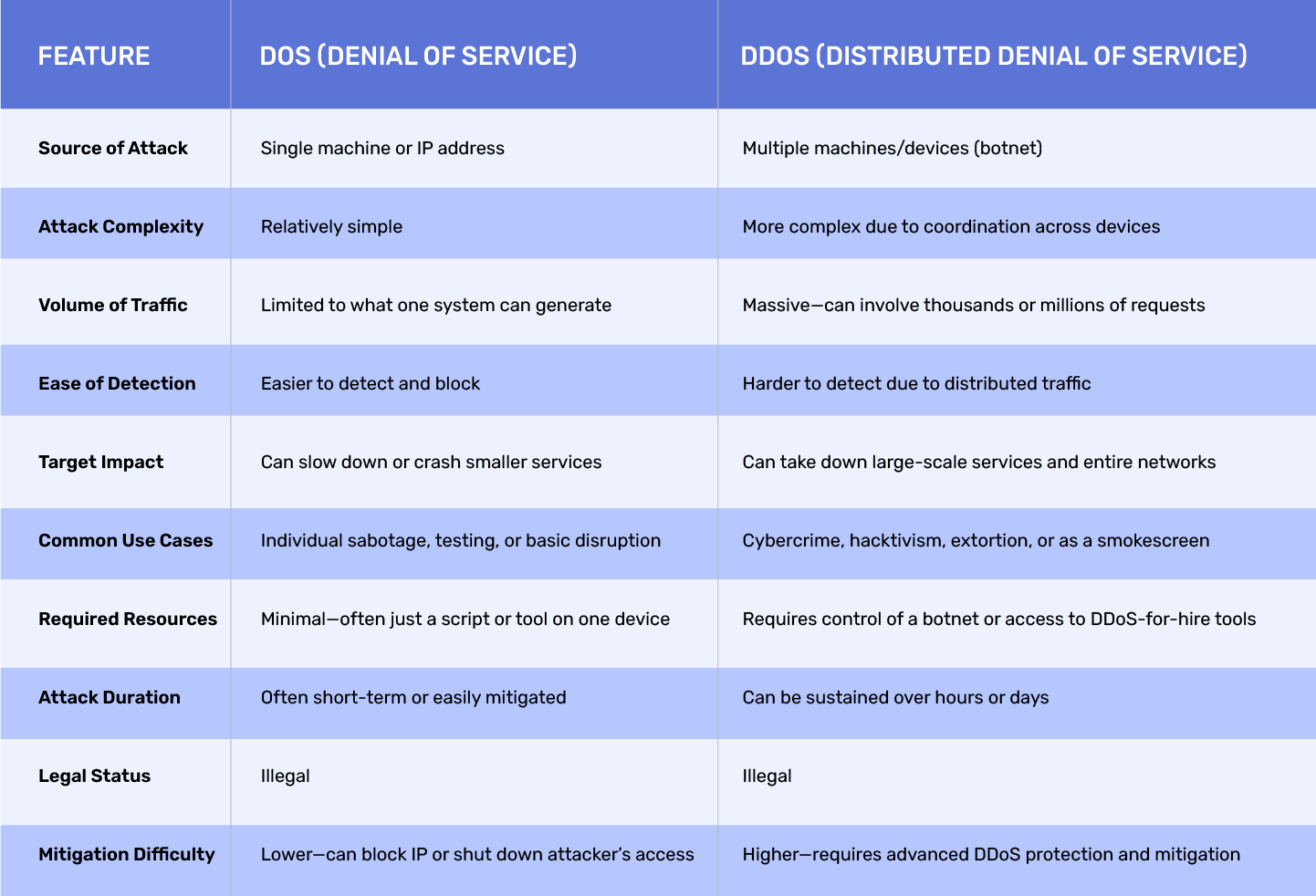
So what’s the difference between DoS and DDoS? A Denial of Service (DoS) attack usually comes from a single machine or internet connection. It’s like one person trying to block the door to a store by standing in front of it.
A DDoS attack, on the other hand, uses multiple machines, often thousands of them. These are usually part of a botnet (we’ll get into that shortly). Think of it like an angry mob rushing a shop entrance, not to buy anything, but just to make sure no one else can get in. That’s the core of DDoS vs DoS.
How Does a DDoS Attack Work?
Let’s break down how these attacks actually happen. It’s not some hacker sitting there typing “OVERLOAD SERVER” into a command prompt.
- Infection of Devices (Botnets): Most DDoS attacks begin by quietly infecting other people’s devices, everything from PCs to smart fridges. These devices are hijacked using malware and turned into “bots,” which are then grouped together into a botnet. Often, the device owners have no idea this is happening.
- Command & Control (C&C) Servers: The hacker controls this botnet using command-and-control (C&C) servers. These servers send instructions to the infected devices, usually telling them when and where to send traffic.
- Traffic Floods the Target: When the attack is launched, the botnet sends a massive flood of traffic to the victim’s server, sometimes gigabits or even terabits per second. It’s not real users trying to access your site, it’s a coordinated swarm of fake traffic.
Result: Service Downtime, Lag, or Total Crash
The result? Slowdowns or total server crashes. For users, it looks like the site is broken. For businesses, it often means frustrated customers, support overload, lost time and money.
Also read: Threat Intelligence Platform
Types of DDoS Attacks
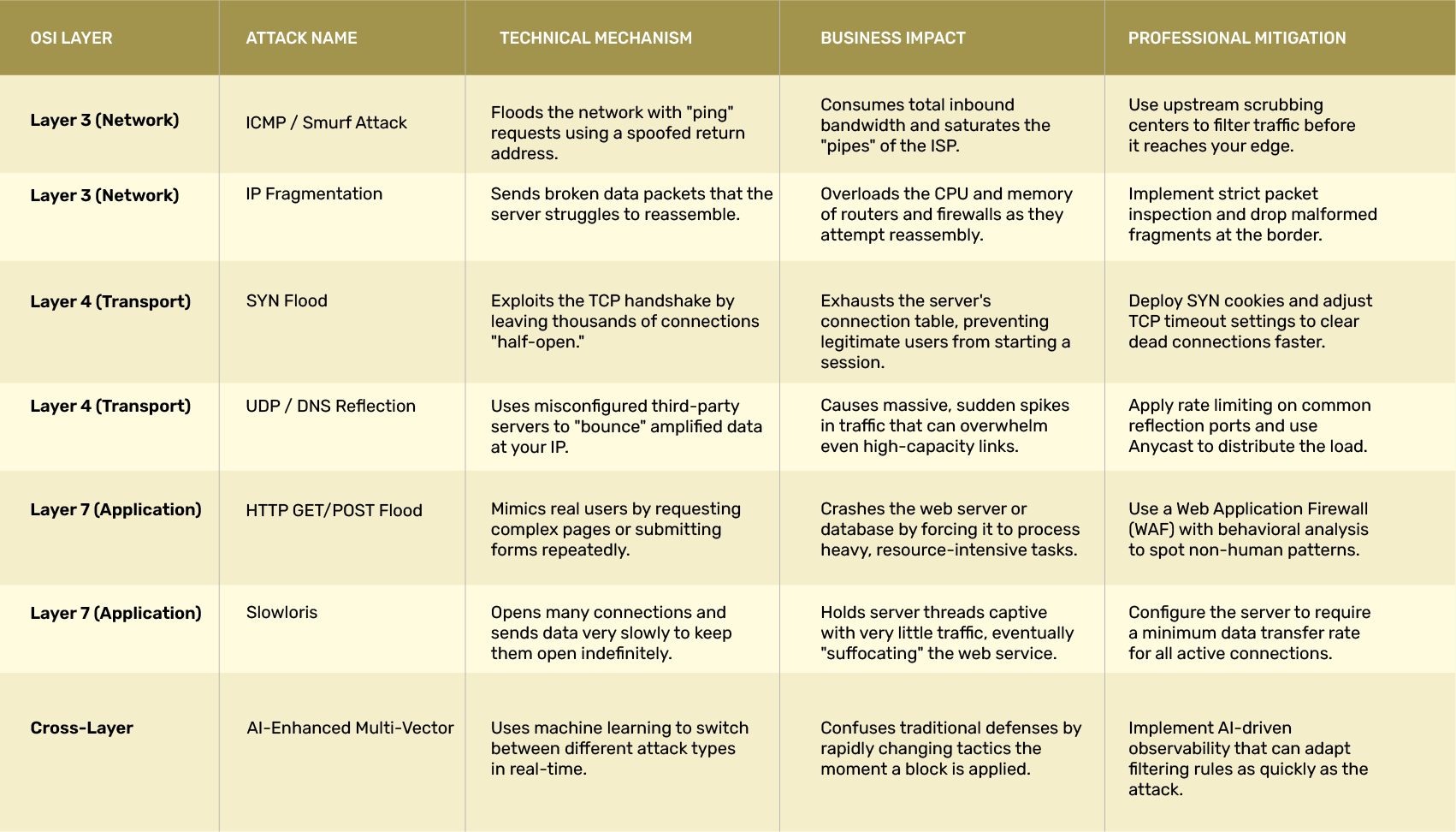
Not all DDoS attacks work the same way. Here are the major categories:
Volume-Based Attacks
These are the digital equivalent of flooding a motorway with cars during rush hour, except all the cars are fake, and they’re only there to block real drivers from getting through.
Volume-based DDoS attacks focus on overwhelming the target’s bandwidth. It’s a numbers game: attackers try to generate as much traffic as possible to choke up the network pipes and make the service unusable for everyone else.
Common techniques used in volume-based attacks:
- UDP floods: These involve sending a massive number of User Datagram Protocol packets to random ports on a server. The server, unsure how to respond, wastes resources trying to process them.
- ICMP floods: Also known as “ping floods,” these send huge volumes of ping requests to the server. The idea is to consume both outbound and inbound bandwidth.
- Spoofed packet floods: These make the traffic appear as if it’s coming from legitimate sources, making them harder to block outright.
These attacks are relatively easy to pull off and are often used in combination with other types to amplify the effect. They can be mitigated using strong DDoS protection services that filter out fake traffic before it reaches the network.
Protocol Attacks
Now we’re getting a little more technical. Protocol-based attacks aren’t about overwhelming bandwidth, they go after the “plumbing” of the internet. They exploit vulnerabilities in how computers and network hardware communicate with each other.
Think of it like someone ringing your doorbell thousands of times per second, but in a way that forces you to respond every single time, draining your energy, even if no one’s actually at the door.
Classic examples include:
- SYN floods: These exploit the TCP handshake process (used when two systems establish a connection). The attacker sends a flood of connection requests but never completes the handshake, leaving the server waiting and wasting resources.
- Ping of Death: Involves sending malformed or oversized pacClassic examples include:kets to crash the system.
- Fragmented packet attacks: These send tiny packet fragments that force the server to spend time and processing power trying to reassemble them, often unsuccessfully.
The goal here is to exhaust the computing resources of routers, firewalls, and servers. Many DDoS mitigation techniques now focus on recognising and filtering out this kind of low-level abuse before it causes damage.
Application Layer Attacks
This is the subtle, ninja-style approach to DDoS attacks, and it’s often the most damaging. Instead of flooding the network or server, application layer DDoS attacks target specific parts of an application or website, usually the parts that are the most resource-intensive.
Imagine someone walking into a restaurant and ordering the most complicated item on the menu, then doing it again and again, hundreds of times a minute, just to clog up the kitchen. That’s basically what’s happening here.
Common attack strategies:
- Repeatedly accessing login pages, search forms, or shopping carts.
- Sending legitimate-looking HTTP requests at a high frequency.
- Using bots that mimic normal user behaviour to avoid detection.
These attacks are particularly dangerous because they often fly under the radar of traditional firewalls and traffic monitoring tools. Since the traffic seems legitimate, it’s difficult to tell the difference between a real customer and an attacker. That’s why proper DDoS prevention for application layer attacks often requires advanced behavioural analysis and traffic profiling.
One particularly tricky part of these attacks is that they don’t require massive bandwidth, just a well-placed request repeated endlessly. This means they can take down large applications with a relatively small botnet, making them a favourite for targeted attacks.
Real-World Examples of DDoS Attacks
When we go back to the history of DDoS attacks, we see a clear evolution from simple technical experiments to sophisticated tools of geopolitical and economic disruption. For those of us who manage digital infrastructure, these historical milestones provide a roadmap of how attackers think and how our defensive technologies have had to adapt to keep pace with an ever-changing threat landscape.
- The Google Multi-Terabit Assault: In a disclosure that sent shockwaves through the industry, it was revealed that Google faced a massive volumetric attack peaking at 2.5 Tbps. This incident highlighted the terrifying scale that modern botnets can achieve. The attackers used several different methods simultaneously to try to find a gap in the edge defenses of the network. This stands as a prime example of why massive, globally distributed scrubbing capacity is the only way to survive a top-tier volumetric strike.
- The Mirai Botnet and the Dyn Outage: This event changed the way we look at everyday devices. By infecting millions of poorly secured internet-connected items like cameras and home routers, the Mirai botnet directed a focused flood of traffic at Dyn, a major DNS provider. Because so many popular services relied on Dyn for their connectivity, a large portion of the internet effectively disappeared for millions of users. This was a “wake-up call” for the industry regarding the inherent risks of the Internet of Things and the critical importance of DNS redundancy.
- The GitHub Memcached Attack: This incident demonstrated the power of “amplification.” By exploiting misconfigured database servers, attackers were able to turn small requests into a tidal wave of data that was 50,000 times larger than the original packet. GitHub was hit with 1.35 Tbps of traffic. What made this example notable was the speed of the response. Because GitHub had a robust mitigation plan in place, they were able to detect the anomaly and route the traffic to a scrubbing partner within minutes, significantly limiting the downtime for their global community of developers.
- The 2025-2026 AI-Driven Campaigns: More recently, we have seen the rise of attacks that use machine learning to bypass traditional security filters. These “smart” botnets can monitor a target’s response in real-time. If a firewall begins to block a specific type of traffic, the botnet automatically shifts its pattern to a different protocol or targets a different part of the application. This has moved the battle away from raw bandwidth and into the realm of behavioral intelligence and automated response.
By studying these events, we can see a common thread: the most successful defenses are never about a single “magic” tool. Instead, they rely on a combination of massive network capacity and a well-rehearsed incident response plan. These real-world examples remind us that while the methods of the attackers will continue to evolve, the principles of resilience remain the same.
Common Tools and Techniques Used in DDoS
Attackers have a full toolbox for this stuff. Tools like LOIC (Low Orbit Ion Cannon) and HOIC (High Orbit Ion Cannon) make it easy for even amateur hackers to join the fray. There are also more sophisticated botnets for hire on the dark web. Many DDoS attacks today are automated and can be launched with just a few clicks.
Signs of a DDoS Attack
Sometimes, a DDoS attack is obvious. Other times, it feels like general internet slowness. Here are some red flags:
Unusually Slow Network Performance
Everything’s sluggish, pages take forever to load, and downloads crawl. If it feels like your internet is stuck in 1997, that’s a possible sign.
Website Crashes or Unresponsiveness
If your site or app suddenly becomes unavailable without a clear internal cause, that’s another potential indicator.
Inability to Access Services From Certain Regions
Some DDoS attacks are geo-targeted. If users from a particular region can’t access your services while others can, something shady might be happening.
Spikes in Analytics or Server Logs
A sudden, unexplained spike in traffic, especially from random or suspicious IPs, is a common clue.
Also read: Attain Cloud Maturity
DDoS Attack Impacts
The effects of a DDoS attack go way beyond a website crashing.
Business Losses
E-commerce sites can lose thousands (or more) in just minutes. Service platforms lose trust and subscribers. Even a short outage during peak hours can hurt. Research found that downtime from availability attacks like DDoS ranks among the costlier categories of security incidents, with the average cost between $6,000 and $22,000 per minute once lost revenue, recovery effort, and customer churn are factored in.
Brand Reputation Damage
Imagine users trying to access your service and being met with errors. They might not come back. Even if the issue wasn’t your fault, they associate downtime with you.
Service Level Agreement (SLA) Penalties
If your business provides uptime guarantees to clients, failing to meet those because of an attack can trigger SLA penalties, and sometimes even lawsuits.
Security Breaches as a Distraction Technique
In some cases, DDoS attacks are used as a distraction, while everyone’s dealing with the downtime, attackers might be slipping in through another door to access data or systems. Cloudflare’s incident reporting has repeatedly noted this pattern, where a loud, visible DDoS attack masks a quieter, more targeted intrusion attempt happening at the same time.
Prevention & Mitigation Techniques
You can’t always stop someone from launching an attack. But you can prepare.
Proactive Defenses
The best DDoS prevention starts with planning. Rate limiting, firewalls, and behavioral analysis tools can catch early signs of trouble.
Cloud-Based DDoS Protection Services
Services like Cloudflare, Akamai, and AWS Shield specialize in DDoS protection. They absorb bad traffic before it ever reaches your servers.
Reactive Measures
If you’re under attack, you’ll need to respond fast. That includes redirecting traffic, contacting your ISP or cloud provider, and possibly even blackholing malicious traffic.
DNS and CDN Configuration
Smart use of DNS routing and CDNs (Content Delivery Networks) can help distribute traffic and reduce single points of failure. These tools don’t stop attacks but can reduce their effectiveness.
These layered defenses reflect best practices outlined by CISA and NIST, both of which recommend combining proactive network hardening with cloud-based scrubbing and a tested incident response plan, rather than relying on any single control.
Also read: Data Security Strategies
DDoS Protection Best Practices
In 2026, we have moved past the era of reactive defense. It is no longer enough to wait for an attack to begin before taking action. A resilient organization treats DDoS protection as a continuous, proactive strategy that integrates speed, technology, process, and people. By hardening your infrastructure before a threat emerges, you ensure that your services remain available even in the face of hyper-volumetric strikes.
The following practices represent the gold standard for modern enterprise protection.
- Shrink Your Attack Surface: The most effective way to stop an attack is to ensure there are fewer doors for an attacker to knock on. Use private connectivity for your internal services and hide your origin servers behind an Anycast network. By blocking unused ports and protocols at the edge, you force attackers to face your most robust defenses first.
- Deploy a Multi-Layered Defense: Since modern attacks often target multiple layers of the OSI model simultaneously, your defense must be equally broad. Implement a Web Application and API Protection (WAAP) strategy that combines traditional firewalling with bot management and API-specific security. This ensures that you are protected against both raw data floods and the more subtle application-layer disruptions.
- Embrace AI and Automation: Nowadays, the speed of an attack often exceeds the speed of human response. Leverage AI-driven mitigation tools that can analyze traffic patterns in real-time and automatically tune their filtering rules. These systems can distinguish between a sudden surge of legitimate holiday shoppers and a malicious botnet with a precision that manual configuration simply cannot match.
- Invest in Massive Scrubbing Capacity: When a volumetric attack reaches the terabit level, local hardware will often be overwhelmed. Partner with a cloud-based scrubbing service that has the global scale to absorb these floods. These providers act as a digital filter, cleaning your traffic at their network edge and forwarding only the genuine requests to your servers.
- Harden Your DNS Infrastructure: As we have seen in major historical outages, the DNS is often the “Achilles’ heel” of a network. Use redundant, geographically distributed DNS providers and implement DNSSEC to prevent cache poisoning. By ensuring your name resolution is resilient, you protect the very first step of every customer interaction.
- Practice and Refine Your Response Plan: Technology is only one part of the equation. You must have a clear, well-rehearsed incident response plan that defines exactly who is responsible for what during an event. Conduct regular simulation tests with your security team to ensure that your runbooks are up to date and that your automated alerts are functioning as expected.
By treating these practices as a core part of your operational DNA, you transform your security from a cost center into a competitive advantage. It allows your team to focus on innovation and growth, knowing that the foundation of your digital presence is built to withstand the most intense pressures of the modern internet.
Legal and Ethical Dimensions
Yes, DDoS attacks are illegal, in most countries, they’re considered a criminal offense.
Laws Surrounding DDoS
In the U.S., the Computer Fraud and Abuse Act covers DDoS attacks. In the UK, it’s the Computer Misuse Act. Other countries have similar laws. Punishments can include fines, jail time, or both.
Law Enforcement Involvement
If your business is attacked, reporting it to law enforcement can help. Agencies like the FBI (in the U.S.) often get involved in larger or recurring incidents.
Conclusion
DDoS attacks might seem like just a tech problem, but they’re really a business problem, a legal risk, and sometimes even a national security issue. Whether you’re running a site or just browsing the internet, understanding how these attacks work and how to prepare for them can make a big difference.
It’s not about living in fear of every outage. It’s about being ready. With the right mix of DDoS protection, smart infrastructure, and fast responses, you don’t have to be a sitting duck.
Faq
The primary objective of a DDoS attack is to strip an organization of its digital availability. Unlike a data breach, which aims to steal sensitive information, a DDoS attack is designed to create a “digital blockade.” By saturating a network with a massive volume of illegitimate requests, it exhausts the available bandwidth, processing power, and memory of the target system.
The result is a service that becomes extremely slow or completely inaccessible to legitimate customers. In a professional context, this often leads to direct financial loss, reputational damage, and operational paralysis. Furthermore, these attacks are frequently used as a tactical distraction to draw the attention of security teams away from a separate, more stealthy intrusion attempt occurring elsewhere in the network.
The duration of an attack can vary significantly based on the attacker’s goals and the tools they are using. As of 2026, we have seen a shift toward “hit and run” tactics where nearly 90% of attacks last less than ten minutes. These short, intense bursts are designed to test defenses or cause immediate disruption without giving automated mitigation tools enough time to adapt.
However, more persistent adversaries may launch campaigns that continue for several hours or even days. In some extreme cases, large-scale attacks have been known to last for over a week, requiring constant vigilance and manual intervention from security specialists. Whether an attack lasts thirty seconds or thirty hours, the goal is the same: to inflict maximum operational pain within that timeframe.
Identifying a DDoS attack in its early stages requires a clear understanding of your network’s normal behavior. The most common “red flags” that indicate you are under attack include:
- Sudden Traffic Spikes: You notice an abrupt and massive increase in requests that has no logical connection to your marketing schedule or current events.
- Performance Degradation: Your website or application becomes painfully slow, or users begin reporting frequent “503 Service Unavailable” errors.
- Geographic Anomalies: You see a flood of traffic originating from regions or countries where you do not typically have a customer base.
- Service Timeouts: Your internal servers or connected APIs stop responding to requests entirely because their resources are fully occupied.
To confirm these suspicions, professional teams use observability tools like NetFlow analysis or SIEM platforms. These systems compare current activity against a “baseline” of your typical traffic, allowing you to see exactly where the malicious requests are coming from and what part of your infrastructure they are targeting.
While attackers are constantly innovating, almost every assault falls into one of three primary categories.
- Volumetric Attacks: These are focused on raw size. They aim to overwhelm your network’s bandwidth by sending so much data that the “pipes” leading to your server become completely clogged.
- Protocol Attacks: These target the internal rules of networking. By exploiting the way servers manage connections, these attacks aim to exhaust the actual hardware resources, such as the CPU and memory of your firewalls or load balancers.
- Application Layer Attacks: These are the most surgical and sophisticated. They mimic the behavior of a real person browsing a website or using an API. Because they look like legitimate traffic, they are much harder to detect and are designed to crash specific functions of your application, such as a search bar or a login portal.
Not directly, since DDoS attacks aim to disrupt availability rather than steal data. However, they’re sometimes used as a distraction, keeping security teams busy with an outage while attackers attempt a separate, quieter intrusion elsewhere in the network.
