
Blog
What Is Identity Governance and Administration (IGA)? Complete Guide for 2026
Reading Time: 8 Minutes

According to a latest industry report on data breaches, nearly 88% of breaches involve stolen credentials or misuse of legitimate access. This pattern is not driven by systems being broken into. It is driven by access that was granted correctly at one point but never re-evaluated.
The issue does not show up immediately. It surfaces during routine checks. An audit asks for a list of users with access to a critical system. The list exists. The justification does not.
A manager is asked to confirm access during a certification cycle. They approve it because the system is unfamiliar. Access stays. No one questions it again.
A service account created for a one-time integration remains active months later. It still works. No one owns it. These are not edge cases. They are common in environments where access is granted once and rarely reviewed.
Most organizations already use Identity and Access Management (IAM) to handle login and permissions. Users can access systems. Systems respond as expected.
What is missing is a way to track whether that access still makes sense after it has been granted.
Identity Governance and Administration (IGA) addresses that gap. It introduces control over access after the initial decision. It tracks who approved access, whether it still applies, and when it should be removed.
What Is Identity Governance and Administration (IGA)?
Identity Governance and Administration (IGA) controls how access is assigned, reviewed, and justified across systems. It focuses on what happens after access is granted. Who approved it. Whether it still applies. When should it be removed.
Most organizations already have access in place. Users can log in. Systems respond. That part usually works.
The problem starts later.
Access is granted during onboarding. It stays during role changes. It remains after projects end. Nobody tracks it centrally because decisions are made inside different systems. Some in HR tools, some in applications, some through email approvals.
Over time, access stops reflecting the role. It reflects history.
This is where IGA fits. It does not replace existing systems. It connects them.
A role defined in HR becomes a trigger. Access to applications follows that role. If the role changes, access changes. If the role disappears, access is removed. That link is what most environments lack.
The same applies to approvals. Instead of someone granting access directly inside a system, the request passes through a defined path. It is approved, recorded, and tied to a policy. Later, when access is reviewed, history is visible.
Nothing here is new behavior. Organizations already onboard users, grant access, and run reviews. The difference is that IGA makes these actions consistent and traceable across systems.
That is where it connects with Identity and Access Management (IAM). IAM ensures that access works at login. IGA ensures that the access itself makes sense over time.
What Is the Difference Between IGA and IAM?
Most organizations use Identity and Access Management to control login and access. That layer is visible. Users authenticate, access systems, and carry out tasks.
The confusion starts when governance is expected from the same system. IAM enforces access. It does not evaluate whether access should exist over time. That distinction is where Identity Governance and Administration lies.
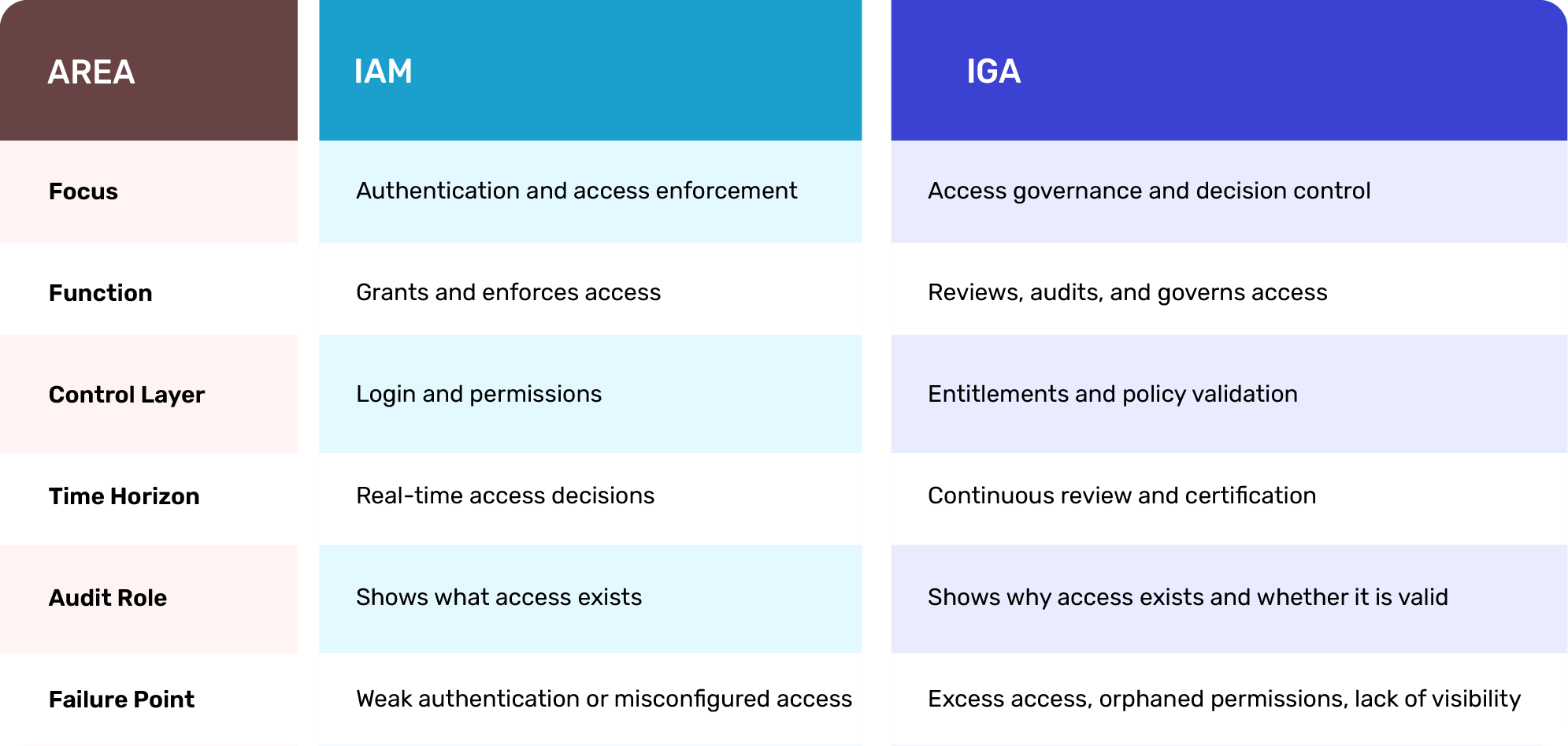
IAM questions: Can this user access the system?
IGA questions: Should this user have access at all, and does that still apply today?
Both operate together, but they solve different problems. IAM handles execution. IGA handles control over time.
This distinction becomes clearer when looking at where IGA is actually used inside organizations and how it changes day-to-day access management.
Where Is IGA Used in Practice?
IGA shows up in places where access decisions need to be controlled, not just executed. The pattern is consistent. Access is not a problem. Unreviewed access is.
1. Joiner, mover, leaver (JML) processes
When a user joins, access is assigned based on roles, not manually across systems. When the role changes, access adjusts. When the user leaves, access is removed everywhere, not just in one directory. IGA ties these changes to a single identity record instead of leaving them distributed.
2. Access requests and approvals
Users do not get access directly inside applications. They request it. The request follows a defined approval path. The approval is recorded and linked to a policy. Later, during audits or reviews, that decision is visible instead of being reconstructed.
3. Access certification and periodic review
Access is reviewed at defined intervals. Managers receive a list of what their team can access. They confirm or revoke it. The system tracks who reviewed what and when. The review is not a checklist. It is a control point.
4. Role and entitlement management
Access is grouped into roles tied to job functions. Instead of assigning permissions one by one, organizations define what a role should access. IGA maintains that mapping and updates when roles change.
5. Segregation of duties (SoD)
Certain combinations of access are not allowed. For example, initiating and approving the same financial transaction. IGA enforces these rules during access requests and flags violations before access is granted.
6. Privileged access governance
High-risk access is controlled separately. Elevated permissions are time-bound, monitored, and reviewed more frequently. This reduces long-standing privileged accounts that are rarely justified.
7. Identity analytics and risk scoring
IGA systems analyze access patterns. They flag unusual combinations, inactive accounts with high privileges, or access that does not align with role definitions. This is not enforcement. It is visibility into risk.
These use cases are not isolated features. They are connected. A role change triggers access updates. That access appears in the next certification cycle. Any exception is recorded and reviewed. So, IGA becomes a control layer, linking identity, access, approval, and review into a single flow that can be tracked and audited.
How IGA Supports Audit and Compliance Requirements
Access control is audited the same way across most frameworks. The terminology changes, but the expectation remains consistent. Auditors need to see who has access, how it was approved, and whether it is reviewed.
IGA consolidates this information into a single system instead of leaving it distributed across directories, applications, and approval channels.
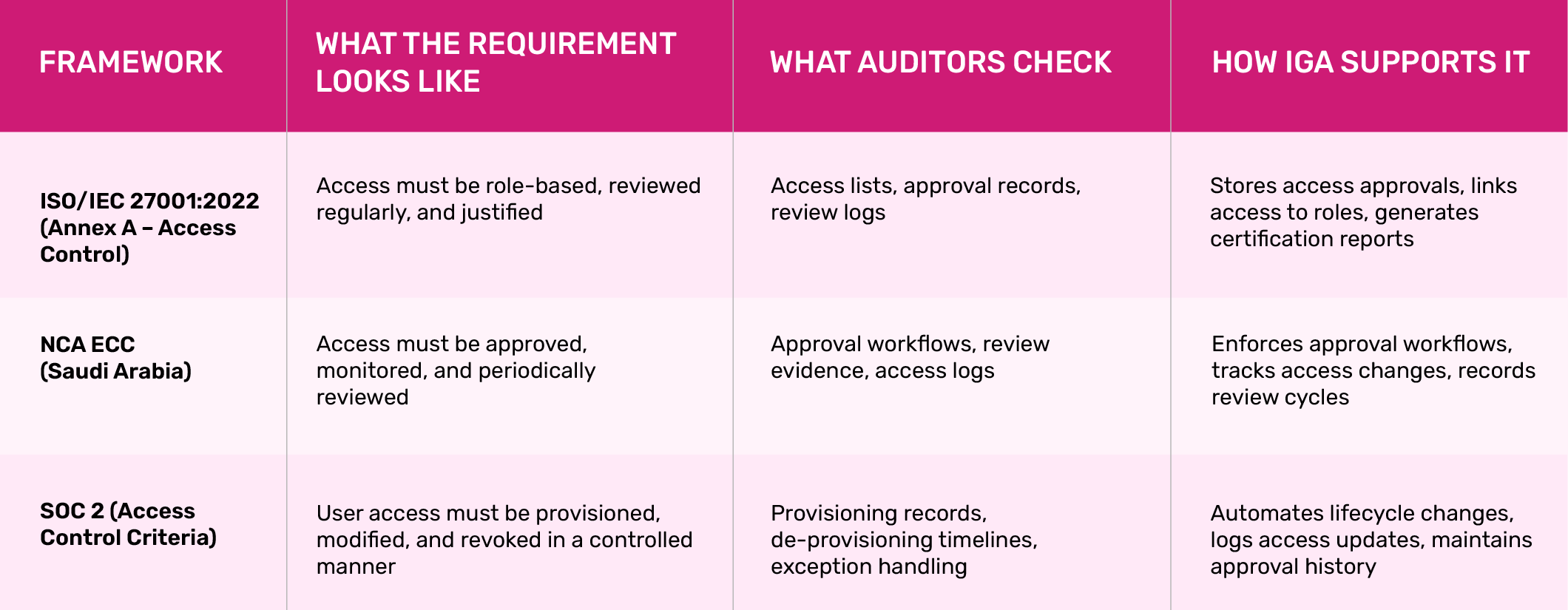
Across these frameworks, the pattern does not change. Identity governance mandates that access must be justified, traceable, and regularly reviewed.
IGA turns these requirements into system outputs. Instead of reconstructing access decisions during audits, organizations can produce records directly from the platform.
What Should Organizations Look for in an IGA Solution?
Most IGA tools look similar at a feature level. The difference shows up during implementation and audit.
A few checks usually separate systems that work from systems that get bypassed.
Integration across systems
IGA only works if it connects to directories, applications, cloud platforms, and third-party systems. If access data sits in silos, governance becomes partial. In practice, teams end up exporting data manually, which defeats the purpose of automation.
Access visibility without reconstruction
The system should show who has access to what, across systems, without stitching reports together. If multiple exports are required to answer a basic access question, the visibility layer is incomplete.
Approval workflows tied to policy
Access requests should follow defined paths based on role or system. Approvals need to be recorded and retrievable. If approvals happen outside the system, they do not exist during audits.
Access certification that people actually complete
Review cycles must present clear, relevant access data. If certification lists are too broad or unclear, managers approve everything without review. The system should narrow decisions to what each reviewer can validate.
Role and entitlement structure that can scale
Permissions should be grouped into roles that reflect job functions. If access is assigned individually, the system becomes unmanageable as users and systems grow.
Audit-ready reporting
The system should produce access lists, approval history, and certification records without additional formatting. If reports need to be rebuilt manually, audit preparation becomes a separate project.
What becomes clear at this stage is that IGA is not a tool selection problem alone. It is an implementation problem.
Most gaps appear not because the tool is missing, but because identity, access, and governance are implemented separately.
How Paramount Helps Organizations Implement IGA
Paramount addresses three consistent gaps in IGA programs: fragmented access data, incomplete review processes, and lack of audit-ready visibility. These issues usually surface when organizations try to scale governance across multiple systems.
The approach focuses on building identity governance as a connected layer across identity, access, and compliance.
-
IGA architecture and role model design
Defines identity structures, role hierarchies, and entitlement models based on how the organization operates, not generic templates.
-
System integration across environments
Connects directories, enterprise applications, cloud platforms, and third-party systems into a single governance layer.
-
Access request and approval workflows
Implements controlled access request paths with recorded approvals tied to policies and roles
-
Access certification and review cycles
Sets up periodic access reviews with defined ownership, ensuring decisions are recorded and repeatable.
-
Policy enforcement and segregation of duties (SoD)
Applies role-based access rules and prevents conflicting permissions at the time of request and during reviews
-
Audit visibility and reporting
Generates access inventories, approval history, and certification records in formats that can be used directly during audits.
IGA only works when identity, access, and governance are implemented together. Treating them as separate layers creates gaps that surface later during audits or system changes.
Recent Posts
FAQ
Microsoft IGA refers to identity governance features within Microsoft Entra (Azure AD), such as access reviews, entitlement management, and lifecycle workflows. These tools help organizations manage user access, enforce policies, and review permissions across Microsoft services and connected applications.
IGA software is a platform that manages identity governance and administration across systems. It tracks who has access, automates approvals, enforces policies, and generates audit-ready reports. It works alongside IAM to ensure access remains controlled and reviewed over time.
IAM controls login and access enforcement, while IGA governs whether that access should exist. IAM ensures users can access systems. IGA ensures that access is justified, approved, reviewed, and aligned with roles and policies over time.
Yes. IGA helps small companies manage access as they grow. It reduces manual access management, ensures proper approvals, and prepares organizations for audits. Early adoption prevents access sprawl and reduces the effort required to implement governance later.

Protect your online assets from cyber threats with Paramount
Comprehensive cyber security solutions for individuals and businesses
Significantly reduce the risk of cyber threats and ensure a safer digital environment.
