
Blog
Securing Data Foundations for AI
Author:
Pradeep Menon
Reading Time: 8 Minutes

Picture an employee who simply asks Copilot to summarize the contents of the HR folder. There is nothing suspicious about the request. But the tool comes back with salary numbers pulled from a spreadsheet that someone shared with “Everyone” back in 2018 and never locked down again. Nobody hacked anything. No one broke a rule on purpose. The AI just did exactly what it was asked to do, using access that should have been cleaned up years ago.
This is the kind of story that comes up again and again when companies start rolling out AI tools at scale, and it is exactly the problem that a recent joint session between Microsoft and Paramount Computer Systems set out to address. The session looked at why so many AI security problems are really old data problems wearing a new outfit, and what an organization can actually do about it.
AI Adoption Is Moving Faster Than Most Security Teams Can Keep Up With
The numbers presented set the stage clearly. AI is no longer something companies are testing in a corner. Roughly 88% of organizations are already using AI in at least one business function, which means AI has moved past the pilot stage and is now part of everyday work. On top of that, around 40% of enterprise applications are expected to have AI agents built into them by the end of 2026, and estimates suggest more than 1.3 billion AI agents could be in active use by 2028.
What does that actually mean for a typical business? It means three things are happening at once:
- AI is already operational: It has moved beyond small pilot projects into the tools people use every single day for their actual jobs.
- Agents are the next big wave: Unlike a chatbot that waits for a question, an agent can take action on its own, reading files, sending messages, calling other systems, and making decisions with very little human oversight in between.
- Security has to grow at the same pace: Any weakness that already exists in your access controls or data hygiene does not stay small. AI tends to take a small gap and make it visible to far more people, far more quickly than before.
The honest question every leadership team should be asking right now is not “should we use AI?” That decision has already been made by employees, whether IT approved it or not. The real question is whether security, governance, and data control can keep pace with how fast AI is spreading.
What Is Actually Happening Inside Your Organization Right Now
Before fixing anything, it helps to ask a few blunt questions about what is already going on. On the AI assistant side, the questions worth asking are: Who is using generative AI tools, and how are they using them? What kinds of AI applications have employees brought in on their own? What sensitive information is being typed into those tools? And once an AI tool produces an answer or a document, is that output actually protected and tracked, or does it just float around unmanaged?
Agents raise a similar but slightly sharper set of questions because tools like Copilot, Copilot Studio, and custom-built agents do not just answer questions, they act on data directly. So the questions become: What sensitive information can these agents actually reach? How many agents are even running across the company right now? Who or what are those agents sharing information with once they pull it? And is anyone keeping a record of what each agent did and why?
Most security teams, when asked these questions honestly, do not have a complete answer. That gap in visibility is the actual starting point for everything else in this guide.
Old Risks, New Risks: Why AI Needs Its Own Checklist
Traditional cybersecurity already covers a fair amount of ground: identity, endpoints, networks, cloud infrastructure, and applications, along with the regulations that govern each of them. AI does not replace any of that. It adds a new layer sitting right on top of it.
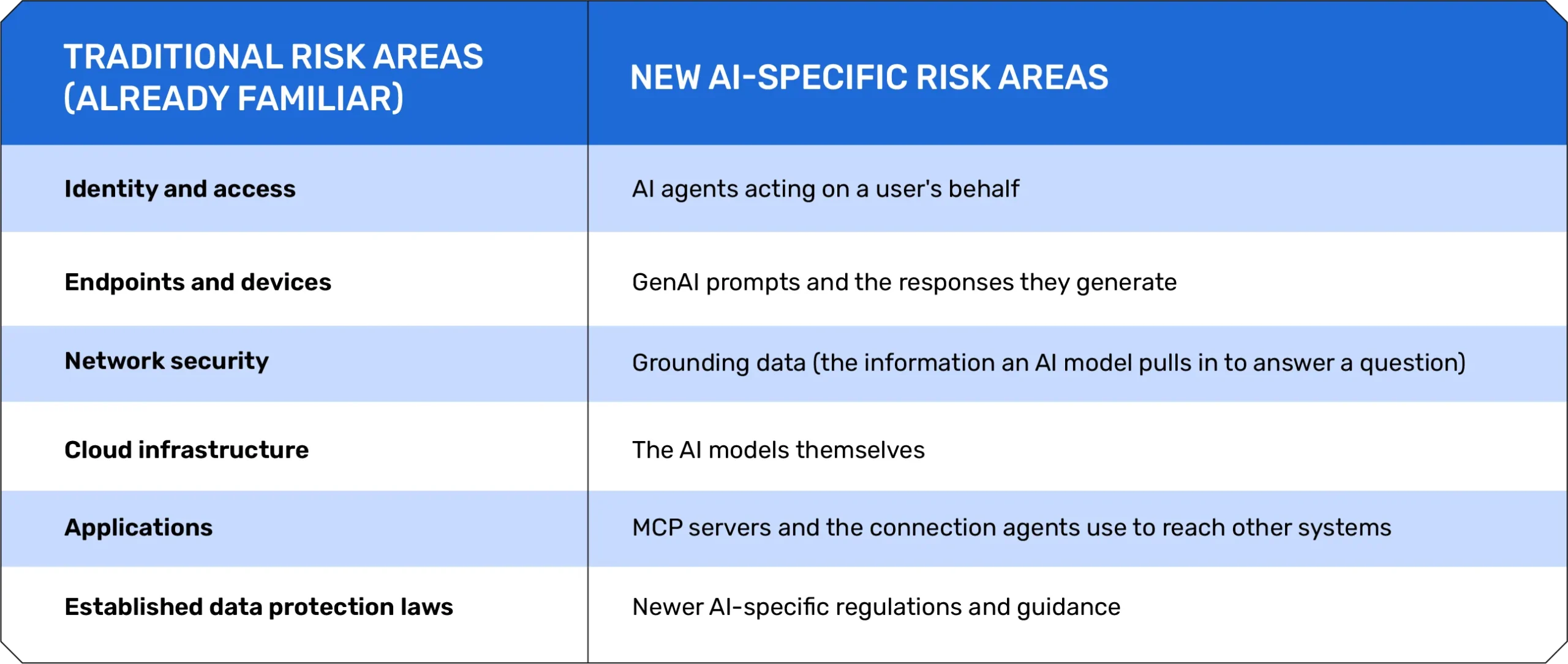
The point is not that one list matters more than the other. It is possible that a company can be fully compliant on the left side of that table and still be wide open on the right side, simply because nobody has updated the checklist yet.
Three Everyday Ways Sensitive Data Already Walks Out the Door
You do not need a sophisticated attacker for AI-related data loss to happen. Three very ordinary, very human scenarios cover most real cases:
- Oversharing by accident: Someone creates a document without setting proper access limits. It sits there quietly until Copilot, doing exactly what it is designed to do, surfaces it to anyone who happens to ask the right question.
- A leak with intent: An unhappy employee asks a generative AI tool to find information about a confidential project, then passes it to a journalist or competitor for personal gain.
- A careless slip: Someone pastes sensitive customer or company information into a free, consumer-grade AI app simply to get a task done faster, with no thought about where that data goes afterward.
None of these requires a criminal mastermind. They require normal human behavior to meet a tool that was never designed with strict boundaries in mind.
The Six Risks AI Introduces to Your Data
Putting all of this together, the session grouped the new threat picture into six specific risks.
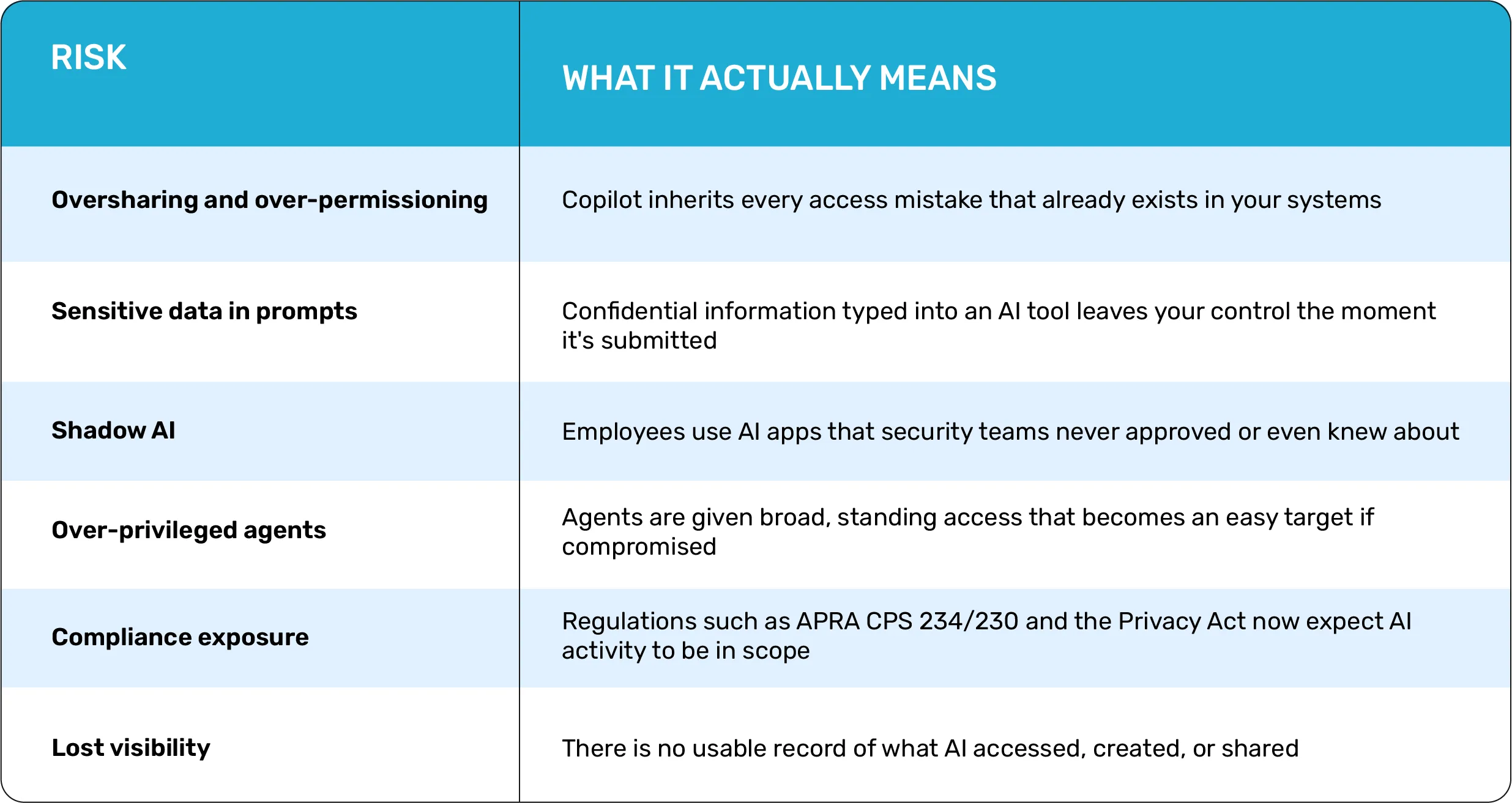
Let’s go through each of these in more detail, because each one has a fairly clear cause and a practical fix using Microsoft Purview.
- Oversharing and over-permissioning: Copilot and similar tools inherit every access mistake that already exists in your systems. If a file was shared too broadly months ago and never cleaned up, AI will happily surface it to anyone who asks the right question. The fix is to find and label overshared files automatically using Microsoft Purview Information Protection, paired with SharePoint Advanced Management, which can spot and correct broken permission inheritance, risky external sharing, and stale access before it becomes a problem.
- Sensitive data in prompts: The moment someone pastes confidential information into an AI tool, that data is effectively out of your hands, even if the AI tool itself is approved for use. A claims handler pasting customer tax file numbers into a public chatbot just to “summarize eligibility” can turn into a reportable privacy breach in seconds. Purview secures your data by inspecting both files and prompts. It uses DLP to warn or block sensitive information before it reaches a model, prevents unauthorized copy-paste actions across devices, and enforces sensitivity labels even when data is only referenced in a prompt.
- Shadow AI: This is the use of AI apps and assistants that your security team never approved or even knows about. It spreads because these tools are easy to sign up for and genuinely save people time, so adoption happens long before any governance does. To fix this, use DSPM for AI to continuously identify, track, and score the risk of the AI apps your employees use. Additionally, use browser, network, and Defender for Cloud Apps controls to block risky actions and restrict unsafe tools.
- Over-privileged agents: When an autonomous agent is given broad, permanent access, for example, full read access to every mailbox and every file, it becomes a single point of failure. If that agent is manipulated through a prompt injection hidden in an email, it can pull and leak everything it was ever allowed to see. To secure agents, treat them as individual identities in Entra with limited, temporary roles. Use sensitivity-aware scoping to restrict their data access and rely on insider risk signals to detect unusual activity, prompt injections, or unauthorized data movement.
- Compliance exposure: AI tools generate, summarize, and share information constantly, and most companies have no consistent record of what was touched, generated, or sent. If a CISO is asked which Copilot sessions accessed personal or financial information last week, the honest answer in many organizations right now is: nobody knows. Compliance Manager helps by mapping pre-built controls to obligations like the Privacy Act, ISO 27001, and AI-specific frameworks, while Audit, eDiscovery, and Communication Compliance capture, retain, and produce AI interactions as evidence whenever regulators or legal teams need it.
- Lost visibility: AI tools generate, summarize, and share information constantly, and most companies have no consistent record of what was touched, generated, or sent. If a CISO is asked which Copilot sessions accessed personal or financial information last week, the honest answer in many organizations right now is: nobody knows. The fix is Unified Purview Audit. It captures user, agent, and Copilot activity across Microsoft 365 in a tamper-resistant log, provides DSPM reporting dashboards for usage trends, and includes eDiscovery with legal hold so AI interactions can be searched and preserved for investigations.
A Closer Look at Shadow AI
Shadow AI deserves its own spotlight because it is the risk most teams genuinely cannot see until they go looking for it. In simple terms, Shadow AI is employees using AI apps and assistants that the security team never reviewed or approved, a fast-growing cousin of the older problem of Shadow IT. It spreads because people are under pressure to get things done quickly, and free consumer AI tools are usually just one click away with no approval process required.
Microsoft’s approach to handling this follows a clear four-step pattern:
- Find it: Defender for Cloud Apps surfaces the generative AI applications already in use across the organization, including ones nobody officially approved.
- Assess the risk: App risk scoring and usage analytics help decide which tools to act on first instead of trying to tackle everything at once.
- Control access: Entra Conditional Access and network controls can block or limit the riskiest applications without disrupting everything else.
- Protect the data: Purview DSPM combined with Endpoint DLP stops sensitive information from reaching unsanctioned AI tools in the first place.
A Simple Four-Step Framework for AI-Ready Data
Once you understand the risks, the session lays out a four-part framework for what it actually means to have a data setup that is genuinely ready for AI.
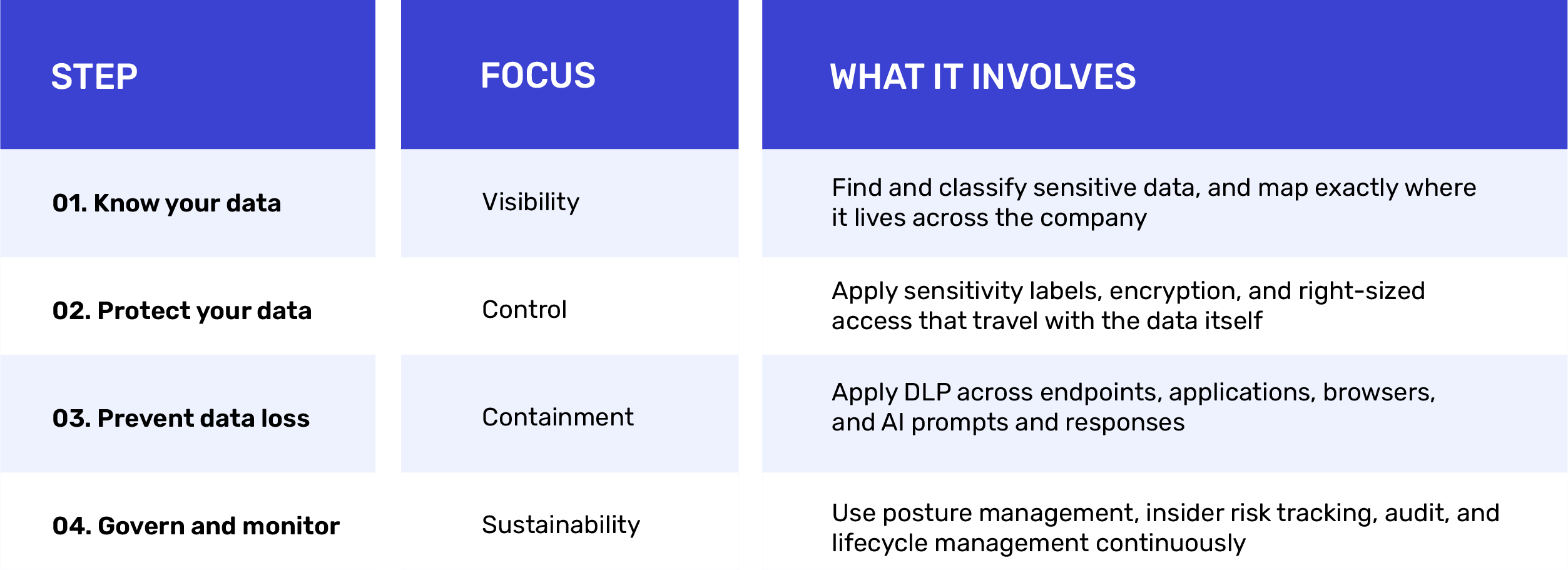
The underlying message is straightforward: secure the data layer first, because every safe AI experience is built on top of it, not alongside it.
Microsoft Purview as the Control Plane for All of This
Rather than treating each of these steps as a separate tool, Microsoft positions Purview as a single control plane that ties them together. Its main capabilities break down like this:
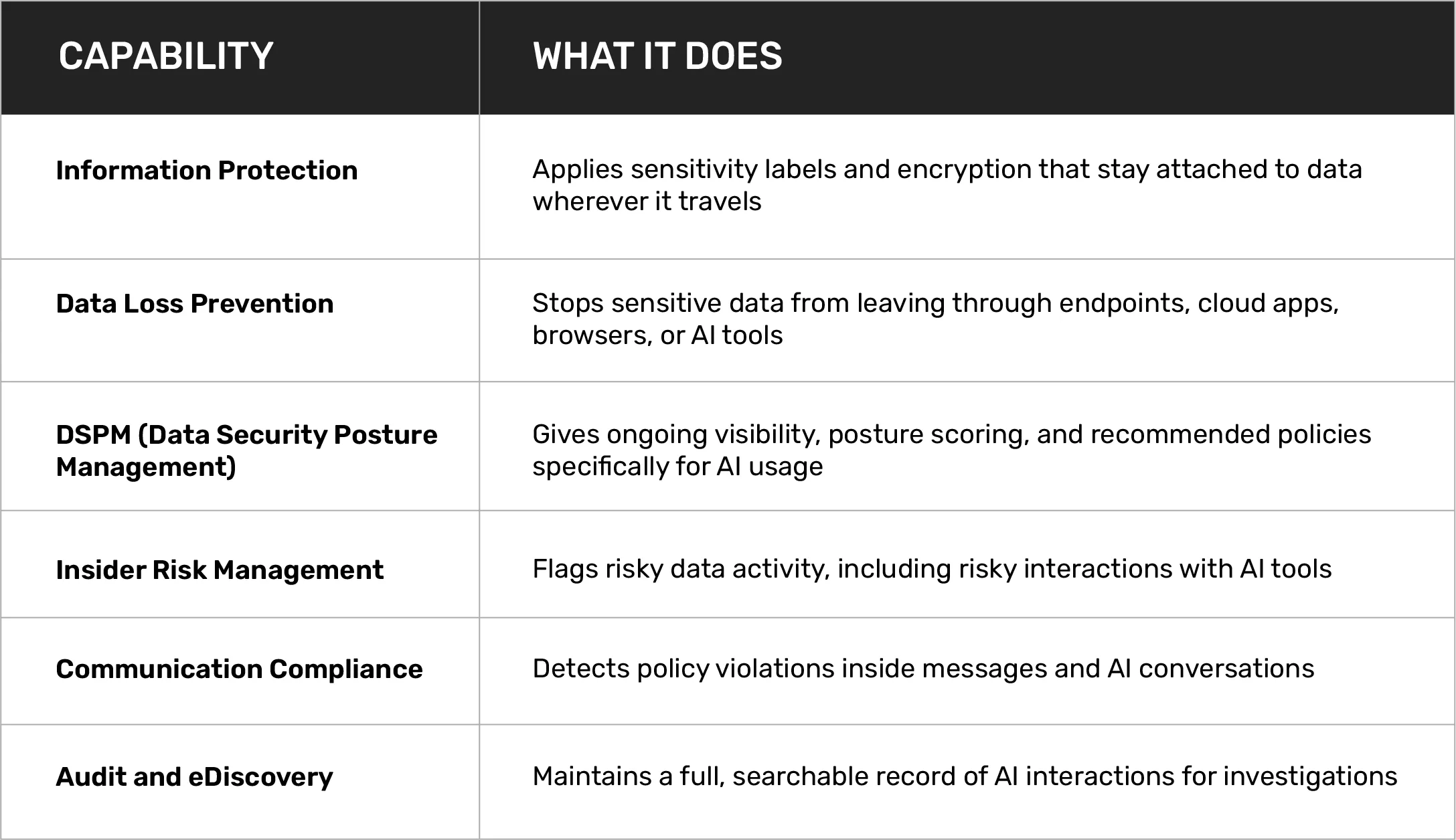
How Paramount Computer Systems Puts This into Practice
Frameworks and product lists are useful, but someone still has to put them to work inside a real organization, with real legacy systems and real budget limits. This is where Paramount Computer Systems’ role comes in, built around three core service lines that map directly onto Microsoft’s security stack.
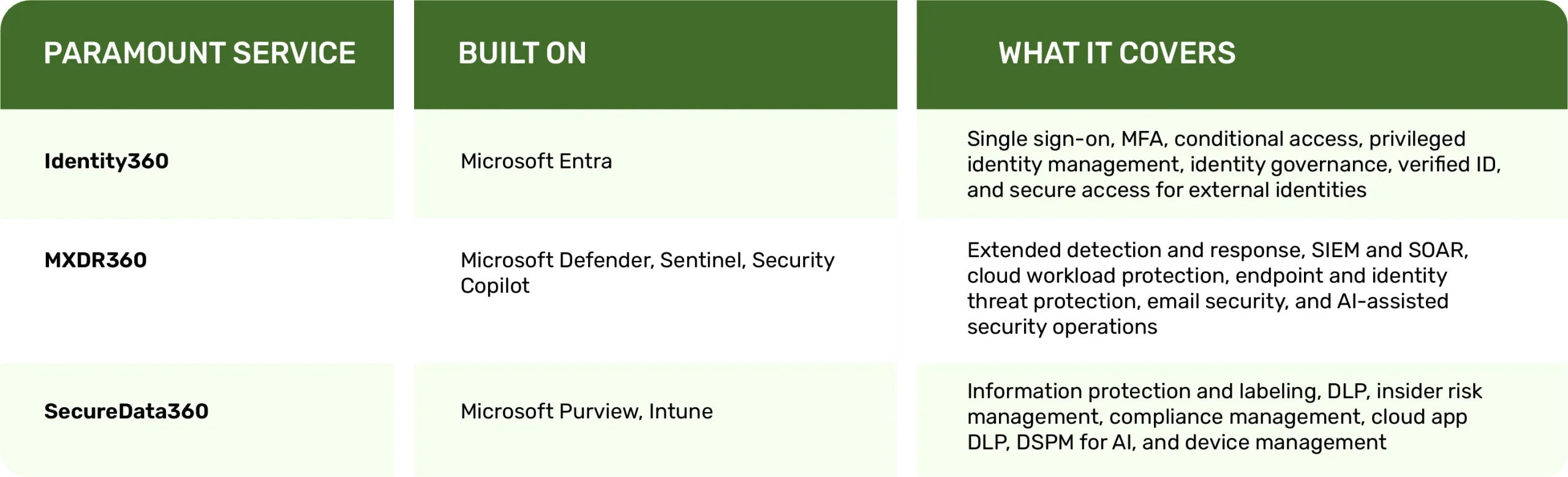
On top of these three pillars sit two managed service layers: Managed Security Services, branded internally as “SOCGenie AI,” providing round-the-clock cyber defense and monitoring, and Managed Security Operations for ongoing day-to-day security operations support. The idea is that a company does not just buy software licenses and hope someone configures them correctly. There is an actual team watching, tuning, and responding continuously.
A Realistic Rollout Plan, Phase by Phase
One of the most practical parts of the session was an honest answer to “How long does this actually take?” Paramount’s typical rollout follows four phases, with the caveat that timelines shift depending on company size, current state, and goals.
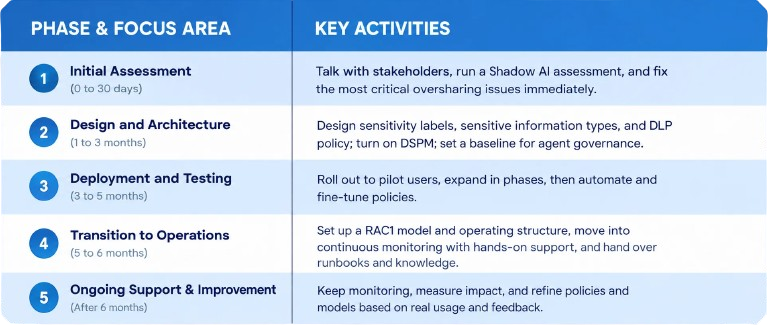
It is worth repeating that these figures are general guidance, not a fixed promise. Actual timelines depend heavily on how messy or clean an organization’s data already is before the project starts.
How Data Governance Actually Gets Done
Underneath the phases above, Paramount’s governance approach for data protection comes down to three ongoing activities: collecting data and deciding what actions apply to it, refining that data so it is usable and accurate, and categorizing it by sensitivity and type. In practice, this often starts with something as simple as a data classification inventory, basically a structured spreadsheet or template that lists what kinds of data exist, where they live, how sensitive they are, and who owns them. It sounds unglamorous, but this single document is usually the foundation that everything else in the framework gets built on top of. You cannot label, protect, or restrict data you have not first written down and understood.
Five Things Worth Remembering
If you take nothing else away from all of this, these five points cover the core message:
- Secure the data foundation first: AI safety genuinely starts with basic data hygiene, classifying, labeling, and right-sizing access before anything else.
- You probably already own the tools: Purview, Defender, and Entra are native parts of many Microsoft 365 licenses and are often sitting unused, just waiting to be switched on properly.
- Find your Shadow AI before it finds you: Pairing visibility with DLP turns an invisible risk into a manageable one.
- Treat agents like employees, not software: Give them identity, least-privilege access, clear ownership, and audit trails, the same way you would govern a person with system access.
- Make security an ongoing habit, not a project: Monitor continuously with DSPM, and consider operationalizing day-to-day work with a trusted partner rather than treating this as a one-time fix.
Where to Start
For any organization looking at this and wondering where to actually begin, three practical entry points came up:
- Run a Data Security and AI-readiness workshop with Microsoft and Paramount together, designed specifically to assess where your company currently stands.
- Run a discovery assessment to switch on visibility tools and see exactly what AI usage already exists inside the company, much of which security teams have likely never seen.
- Get more value from your existing E5 license by turning on Purview controls and fixing the most pressing oversharing issues before expanding Copilot any further.
None of these requires ripping out existing systems or starting from scratch. Most companies already have a meaningful chunk of what they need sitting inside licenses they are already paying for. The real work is in actually configuring it, monitoring it, and treating it as a continuous responsibility rather than a box to tick once and forget about.
AI adoption is not going to slow down to wait for security teams to catch up. The organizations that come out ahead will be the ones that treat data security as the actual foundation of their AI strategy, not an afterthought bolted on once something has already gone wrong.
Final Thoughts
Building a secure data foundation for AI is not a one-time task but an ongoing process. It involves classifying and protecting data, governing how AI systems and agents use that data, and keeping an eye on how employees use external AI tools. By applying strong data governance, encryption, access controls, and monitoring, organizations can enjoy AI’s benefits while minimizing risk. Remember that even as tools evolve, the core principles remain the same: know your data, protect it wherever it goes, and hold every AI access point to the same security standards as any other business application. Companies that follow these steps will be well-prepared to harness AI’s power responsibly, meeting regulatory demands and earning the trust of customers and stakeholders alike.
ABOUT AUTHOR

Pradeep Menon - Chief AI & Information Security Officer

With over two decades of experience advising enterprises and government bodies on cybersecurity strategy and compliance, he has led large-scale security programs across BFSI, Government, and Retail sectors throughout the GCC. His expertise lies in aligning cybersecurity frameworks with complex digital transformation initiatives, ensuring resilience at scale. A recognized thought leader, he is frequently invited by industry forums to share insights on the evolving intersection of Artificial Intelligence, cybersecurity, and regulatory compliance, helping organizations adopt AI-driven security strategies responsibly and effectively.
Recent Posts

Protect your online assets from cyber threats with Paramount
Comprehensive cyber security solutions for individuals and businesses
Significantly reduce the risk of cyber threats and ensure a safer digital environment.
