Published Date : September 18, 2025

What is ICMP?
The Internet Control Message Protocol (ICMP) is a protocol that devices within a network use to communicate problems with data transmission. We often call ICMP the “Nervous System” of the Network. It provides the vital feedback loops that tell IT teams whether their infrastructure is healthy or if it’s currently under stress.
ICMP Protocol Explained in Simple Terms
In simple terms, ICMP is the “Support Staff” of the Internet.
When you use the internet, most of the “work” is done by the Internet Protocol (IP), the system that addresses and moves packets of data from point A to point B. But IP is a “best-effort” system; it doesn’t have a way to handle problems if a road is blocked or a destination is missing. That’s where ICMP comes in. It carries the status reports about that cargo, instead of the cargo(your emails or files) itself.
The “Foreman” Analogy
Think of a construction site where a fleet of trucks (IP) is delivering bricks.
- IP is the driver who knows the address and drives the truck.
- ICMP is the foreman standing by the gate with a radio.
If a truck arrives at a bridge that is too low to pass, the driver doesn’t just sit there forever. The foreman (ICMP) sends a message back to the warehouse saying, “Route Blocked” (Destination Unreachable). If a truck has been driving around in circles for hours and hasn’t found the site, the foreman sends a message saying, “Time’s Up” (Time Exceeded), and the truck is taken off the road.
Why ICMP is Important in Networking
Often, we focus on the “heavy lifters”, the high-bandwidth protocols that move our gigabytes of data. But any seasoned network engineer will tell you that ICMP is the unsung hero of operational confidence. It isn’t just a technical requirement; it is the primary way we maintain visibility into the health and reliability of our digital business.
Here is why ICMP remains a critical pillar for any modern organization:
- The Foundation of “Operational Observability”: In 2026, we’ve moved past simple “Up/Down” monitoring. We now look at the Quality of Experience. ICMP provides the raw data for our AI-driven monitoring tools to calculate latency, jitter, and packet loss. Without ICMP, your dashboard might say a server is “Up,” but you wouldn’t know that the 200ms lag is currently making your customer-facing app unusable.
- Rapid Failure Domain Isolation: When a cloud service goes dark or a remote branch loses connectivity, the clock starts ticking. ICMP is the tool that tells us where the break happened. Is it our local router? Is it a provider’s backbone? Or is it a specific hop in a public cloud region? By providing this “hop-by-hop” feedback, ICMP allows IT teams to stop guessing and start fixing, drastically reducing the Mean Time to Repair (MTTR).
- Traffic Management and Efficiency: ICMP doesn’t just report errors; it helps optimize the flow of data. For example, ICMP Redirect messages allow routers to tell your devices, “Hey, there’s a shorter path to your destination, take the next left instead.” This constant, quiet background communication ensures that your network isn’t wasting bandwidth on inefficient routes.
- A Safety Valve for Network Loops: Networking isn’t perfect, and occasionally data can get caught in an infinite loop. ICMP acts as the “safety valve.” Using the Time to Live (TTL) field, it ensures that if a packet wanders for too long without finding its home, it is safely discarded, and a report is sent back to the source. This prevents a small routing error from spiraling into a network-wide “broadcast storm” that could crash your entire infrastructure.
- The Bridge to Hybrid Cloud Reliability: As we rely more on multi-cloud and SD-WAN architectures, the path between your office and your data is constantly shifting. ICMP is the “heartbeat” that validates these connections. It ensures that the “tunnels” connecting your secure environments are stable and capable of handling the traffic you’re throwing at them.
How ICMP Works
To understand how ICMP works, you have to think of it as a “ride-along” protocol. It doesn’t travel on its own separate network; instead, it hitches a ride inside the standard Internet Protocol (IP) packets that move all our data. Because it is connectionless, it doesn’t waste time with a “handshake” or a formal introduction. It just sees a problem (or receives a request) and immediately sends out a report.
In 2026, we describe this as a Reactive Protocol. It sits quietly in the background until an event, like a dropped packet, a full buffer, or a manual “ping” command, triggers it to generate a message. Once triggered, it follows a very specific sequence to ensure the right information gets back to the right person.
Step-by-Step Working
- The Trigger Event: The process starts when a network event occurs. This could be a “Request” (you sending a Ping) or an “Error” (a router realizing it can’t find the path to an IP address).
- Message Generation: The device that spotted the issue (could be a router, a server, or your own laptop) creates an ICMP message. This message contains two vital pieces of info: a Type (the broad category, like “Destination Unreachable”) and a Code (the specific detail, like “Network Unreachable” vs. “Port Unreachable”).
- Data Encapsulation: The ICMP message is then “wrapped” inside a standard IP header. This header acts like the envelope, providing the source and destination addresses so the report knows where to go. It’s worth noting that ICMP messages often include a “snippet” of the original data that caused the error, so the sender knows exactly which part of their communication failed.
- The Journey Across the Wire: The packet is sent out across the network. Because it’s a lightweight ICMP packet, routers usually prioritize it or handle it quickly so the diagnostic info reaches its destination as fast as possible.
- Processing the Signal: When the destination device receives the ICMP packet, it strips away the IP “envelope” and reads the Type and Code. If it were a Ping (Echo Request), the device immediately generates its own ICMP “Echo Reply” and sends it back.
- The Result Analysis: Finally, the original sender receives the message. Your network monitoring tools, or your command prompt, translate those raw codes into something human-readable, like “Request Timed Out” or “0% Packet Loss.”
Types of ICMP Messages
Echo Request and Echo Reply (Ping)
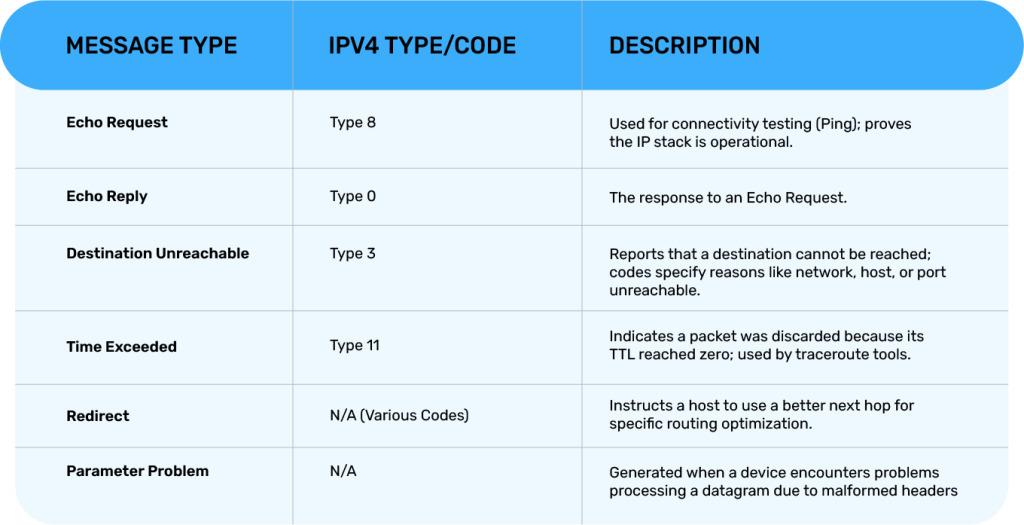
Echo request and echo reply are type 8 and type 0 in IPv4, respectively. They are the simplest and most recognizable ICMP messages. A typical ping session sends multiple echo requests with incrementing sequence numbers. Targets that receive and reply to echo requests prove that their IP stack is operational and reachable at the IP layer.
Because the ICMP ping is so common, many devices provide rate limiting or control responses. Network administrators should document expected behavior for infrastructure devices and compute instances, and should account for the possibility that security controls block or modify echo replies.
Destination Unreachable Messages
Destination Unreachable messages (type 3 for IPv4) tell a sender that the target destination cannot be reached for a specific reason. Codes offer additional context, such as network unreachable, host unreachable, protocol unreachable, port unreachable, fragmentation needed, and fragment reassembly failed, or source route failed. Applications that send datagrams benefit from these messages because they can implement fallback behavior, for example, switching ports or retrying with fragmentation adjustments.
Time Exceeded Messages
A Time Exceeded message indicates that a packet was discarded because its TTL reached zero. These messages are type 11 in IPv4. Traceroute tools intentionally send packets with small TTLs; each router along the path decrements TTL, and when it reaches zero the router issues a Time Exceeded response. Mapping the sequence of responding routers yields a path topology and provides timing measurements for each hop.
Time Exceeded messages are also indicators of routing loops or misconfiguration when they appear unexpectedly in production. Detecting a sudden increase in such messages can prompt an investigation into flap-prone routing or incorrect static routes.
Redirect Messages
Redirect messages instruct a host to update its routing so that it sends future packets for a destination via a better next hop. They are typically generated by routers and come in different codes indicating whether the redirect is for a host or network and whether it is for a specific type of traffic. Redirects can be useful in dynamic networks, but must be treated carefully from a security perspective because spoofed redirects can subvert routing. Many environments restrict or disable redirects, preferring explicit routing policies or dynamic routing protocols rather than ICMP-based route adjustments.
Parameter Problem Messages
Parameter Problem messages are generated when a router or host encounters a problem in processing a datagram due to a malformed header or unexpected value. They indicate an issue such as an invalid option or a misaligned header field. These messages permit debugging of implementation errors, corrupt packets, or misbehaving network devices. Because they can include sensitive information about internal processing, production systems often log them but may not expose them broadly.
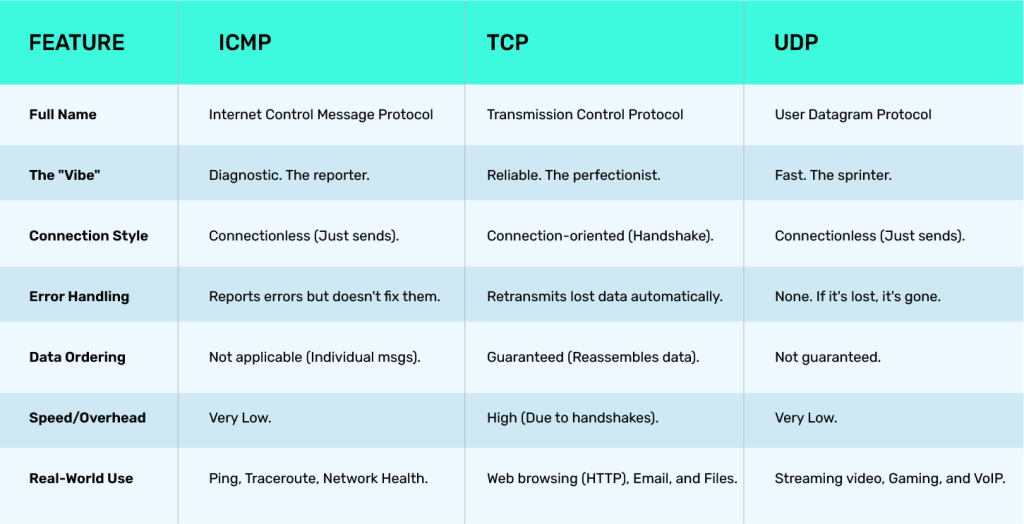
ICMP vs TCP vs UDP
Think of TCP as a certified letter, it’s reliable, requires a signature (handshake), and ensures everything arrives in the right order. UDP is more like a live broadcast; it’s incredibly fast, but if a few frames are dropped along the way, it doesn’t stop to pick them up. ICMP, by contrast, is the “status light” on the dashboard that tells you if the engine is running or if the road ahead is closed.
In 2026, the choice between these protocols isn’t about which one is “better,” but about which one fits the specific needs of your application, whether that’s a high-stakes financial transaction (TCP), a real-time video stream (UDP), or a critical network health check (ICMP).
Common ICMP Tools
Common ICMP Tools
While modern IT departments are full of AI-driven observability dashboards and complex monitoring suites, sometimes the most effective way to diagnose a problem is to go back to the basics. The “tried and true” ICMP-based tools are still the first thing most engineers reach for when they need a quick sanity check or a deep dive into a connectivity bottleneck.
- Ping (The “Heartbeat” Check): This is the ultimate “are you there?” tool. It’s the sonar of the networking world. By sending an ICMP Echo Request and waiting for the Echo Reply, Ping tells you two vital things: if the destination is alive and how long it took to respond (latency). In a professional setting, a “ping” isn’t just a test; it’s a baseline for measuring the stability of a connection over time.
- Traceroute / Tracert (The “Route Map”): If Ping tells you that there is a problem, Traceroute tells you where the problem is. It uses ICMP “Time Exceeded” messages to map out every single “hop” or router between you and your destination. If your data is getting stuck at a specific provider in another country, Traceroute is the tool that shines a light on that specific blind spot.
- MTR (My Traceroute): This is the professional’s choice for real-time troubleshooting. MTR combines the functionality of Ping and Traceroute into a single, constantly updating display. It’s particularly useful for spotting “intermittent” issues, those annoying glitches that happen for a few seconds and then disappear. It allows you to watch the packet loss and latency at every hop in real-time, making it much easier to hold service providers accountable for performance drops.
- PathPing: A middle ground between the others, PathPing is a Windows-based tool that sends pings to each hop over a period of time and then computes results based on the packets returned from each. It’s a great way to get a statistical view of where the most “friction” is occurring on your network path.
- Hping / Nping: These are the “power tools” for security professionals and network architects. Unlike a standard ping, these allow you to “craft” custom packets to test firewall rules or simulate specific types of traffic. They are essential for Stress Testing and verifying that your security “zones” are actually as locked down as you think they are.
- Cloud Synthetic Monitors: In 2026, we’ve taken ICMP into the cloud. Most modern observability platforms (like Datadog or New Relic) use “Synthetic ICMP” probes. These are automated pings sent from various locations around the world to your servers. This gives you a “Global Pulse,” letting you know if your customers in London are experiencing more lag than your customers in Dubai.
ICMP’s Role in Network Security and Performance
Using ICMP for Network Monitoring and Diagnostics
Administrators leverage ICMP for continuous monitoring and lightweight diagnostics. Synthetic monitoring uses regular ping probes from distributed vantage points to measure RTT and packet loss. Alerting thresholds can indicate route degradation or device overload. When alerts trigger, ICMP-based measurements often provide an early indicator that something deeper requires packet capture or flow analysis.
ICMP and DDoS Attacks: How ICMP Can Be Exploited
The ICMP protocol has historically been abused in distributed denial-of-service attacks. Attackers use several techniques that leverage ICMP semantics or network behavior:
- Ping Floods: Attackers send high volumes of ICMP echo requests to overwhelm a target’s bandwidth or processing capacity. A simple ping flood can saturate links or exhaust CPU on less capable hosts.
- Smurf Attacks: By sending ICMP echo requests with a spoofed source address that is the target, to a broadcast address, attackers cause multiple systems to reply to the target, amplifying the attack. Network devices and administrators mitigate this by disabling directed broadcasts and filtering packets with spoofed source addresses.
- ICMP Amplification: Although ICMP itself is not strongly amplifying, reflection techniques using misconfigured or abused services can increase attack volume directed at the victim. Attackers seek amplifiers across protocols, and ICMP-based reflection remains a vector where broadcast behavior is possible.
- ICMP-based Probing and Reconnaissance: Attackers use ICMP to map active hosts, discover network structure with traceroute-like techniques, and identify devices that respond. This intelligence can guide follow-on attacks.
These exploit patterns are often grouped under ICMP ddos attacks in operational discussions. Defensive strategies include rate limiting, ingress filtering, anti-spoofing measures, and distributed mitigation services that absorb or drop malicious ICMP traffic before it reaches sensitive infrastructure.
ICMP Filtering: Securing Networks from Malicious Traffic
To balance diagnostic needs and security, networks employ selective ICMP filtering. Best practice typically includes permitting necessary ICMP types and codes while restricting others. For example, allowing echo reply and destination unreachable messages from known networks aids diagnosis but blocking redirects reduces exposure to malicious route manipulation. Firewalls and access control lists can implement stateful handling that permits response packets only for legitimate traffic while preventing unsolicited ICMP from untrusted sources.
ICMP and Its Use in Troubleshooting Network Issues
How ICMP Ping Helps Diagnose Network Latency and Packet Loss
The ICMP ping utility remains a primary instrument for engineers. By sending repeated echo requests and measuring the rate of replies and timing, operators get immediate visibility into latency, jitter and packet loss. Patterns can reveal congested links, overloaded devices, or routing anomalies. A consistent increase in RTT at a specific hop indicates localized congestion or processing delays.
Traceroute and ICMP: Mapping Network Paths
Traceroute utilities commonly use ICMP or UDP with increasing TTLs to elicit Time Exceeded messages from intermediate routers. Each responding hop reveals the interface that forwarded the packet, allowing construction of the forward path. When some routers suppress ICMP responses, traceroute may show timeouts or stars for certain hops, yet subsequent hops may still respond, indicating an opaque router behavior rather than a total path failure.
Engineers use traceroute to identify routing loops, unexpected AS-level paths, and points of failure. Combining traceroute with BGP route views and flow data helps resolve whether an issue is due to policy routing, peering changes, or link-level failure.
ICMP’s Contribution to Network Performance Monitoring
In large-scale networks, distributed ICMP probes complement telemetry and flow analysis. Synthetic probes can be scheduled from multiple vantage points, including cloud providers and remote offices, to detect degradation not evident from a single monitoring location. ICMP-based health checks often trigger automated remediation workflows in orchestration systems that reroute traffic or flag support tickets.
ICMP in Modern Networking Technologies
ICMP in IPv4 vs IPv6 Networks
In IPv6, ICMP evolved into ICMPv6 and expanded responsibilities. ICMPv6 handles error and informational messages analogous to IPv4 but also integrates neighbor discovery, duplicate address detection and router advertisement functions. Because ICMPv6 is integral to IPv6 operation, filtering it indiscriminately will break core functionality. This contrasts with IPv4 where some ICMP types are treated as optional.
ICMP and Network Automation in SDN (Software-Defined Networking)
Software-defined networking controllers and orchestration platforms use ICMP data for validation and automated policy enforcement. SDN controllers can initiate synthetic ICMP probes to validate path connectivity after policy changes or migration. The ICMP protocol thus becomes a part of automated testing pipelines that confirm network behavior post-deployment.
How ICMP Supports Internet of Things (IoT) Devices and Communications
IoT devices often rely on basic network-layer utilities for reachability checks and simple diagnostics. The ICMP ping function proves useful for constrained devices to signal presence or for management systems to verify liveness. However, constrained devices may implement only minimal ICMP handling and may be sensitive to extra load. Security considerations are acute because many IoT devices have limited processing power, outdated stacks, and weak authentication.
ICMP Best Practices for Network Administrators
Configuring ICMP to Ensure Network Health
Network administrators should document which ICMP types are allowed across various zones. Core recommendations include:
- Permit echo request and reply within trusted administrative networks for diagnostics.
- Allow destination unreachable and time exceeded messages as needed to support path MTU discovery and traceroute, but log and rate-limit them when crossing security boundaries.
- Disable or ignore redirects in environments that use explicit routing or dynamic protocols.
- In IPv6 networks, ensure essential ICMPv6 types are permitted for neighbor discovery; otherwise address resolution and router advertisement will fail.
Configuration must align with operational processes so that teams can diagnose problems without exposing the network to trivial reconnaissance.
ICMP Rate Limiting and Best Practices for Security
Rate limiting reduces the risk of ICMP ddos attacks and prevents legitimate devices from being overwhelmed by probes. Devices and routers should apply per-source and per-type rate-limiting policies. Best practices include:
- Implement token-bucket or leaky-bucket rate-limiting for ICMP responses.
- Differentiate limits for internal and external traffic.
- Log rate-limited events in a way that is actionable and not noisy.
- Combine rate limiting with anomaly detection to identify sudden surges consistent with attack patterns.
Rate limiting must be tested to avoid interfering with valid operational diagnostic activity such as network convergence events.
Monitoring ICMP Traffic to Detect Potential Network Issues
Monitoring systems should include ICMP as a first-class telemetry source. Alerting rules can detect:
- Sudden increases in echo traffic suggesting reconnaissance.
- Spikes in destination unreachable messages indicating routing failures.
- Persistent time exceeded responses that may indicate loops or MTU problems.
- Geographically correlated probe surges that may be part of coordinated scanning or DDoS.
Combining ICMP telemetry with flow and host security logs improves root cause analysis and prevents false positives.
ICMP Security Measures for Protecting Against Ping Floods and Other Attacks
Mitigation techniques used to protect against ping flood and other ICMP-based attacks include
- Ingress and egress filtering to block spoofed source addresses using BCP 38 anti-spoofing recommendations.
- Blocking directed broadcast addresses at network edges to prevent smurf attacks.
- Leveraging upstream DDoS mitigation services to absorb volumetric traffic.
- Applying ACLs and firewall rules to deprioritize or drop unsolicited ICMP from the public Internet while allowing legitimate management traffic.
- Implementing stateful firewalling that permits ICMP replies only if a legitimate flow originated.
Architects should combine these measures with incident response playbooks that specify escalation paths when ICMP attacks coincide with other network events.
Advantages and Limitations of ICMP
We often describe ICMP as a “double-edged sword.” It is arguably the most useful diagnostic tool in a network engineer’s kit, but because it is so simple and powerful, it can also be exploited if not managed with a strategic hand.
The Advantages: Why We Can’t Live Without It
- Zero-Overhead Diagnostics: Because ICMP doesn’t require a “handshake” like TCP, it is incredibly fast and lightweight. It allows you to get an instant “pulse” on your network health without taxing your bandwidth or CPU.
- Universal Language: Every internet-connected device, from a massive data center server to a small smart-home sensor, understands ICMP. This makes it the “lingua franca” for troubleshooting across different vendors and platforms.
- Automatic Path Optimization: ICMP isn’t just about errors; it’s about efficiency. Through MTU (Maximum Transmission Unit) Discovery, ICMP helps your devices figure out the largest “package” they can send without it breaking apart, ensuring your high-speed fiber links are running at peak performance.
- Logical Fault Isolation: When a service goes down, ICMP allows us to “triangulate” the failure. By seeing exactly which hop stops responding, we can determine if the issue is a local hardware failure, an ISP outage, or a remote cloud configuration error.
Challenges and Limitations of ICMP
ICMP in High-Security Environments
High-security environments often restrict ICMP to reduce reconnaissance surface. While reduction of ICMP exposure can hinder attacker visibility, it can also impede legitimate diagnostic workflows. Security teams must balance the need to limit attack surface with operational necessity. Where restrictions exist, alternative secure diagnostic channels should be available such as authenticated telemetry or out-of-band management networks.
The Risks of Allowing Unrestricted ICMP Traffic
Unrestricted ICMP traffic exposes networks to mapping and volumetric attacks. Attackers can enumerate hosts, derive topology, measure latency patterns, and attempt reflection-based amplification. Unrestricted responses on devices with limited resources may be used as vectors to exhaust CPU and memory. Thus unrestricted ICMP should be avoided except in controlled administrative contexts.
Handling ICMP in Encrypted Network Layers
Encrypted overlays and VPNs introduce nuances for ICMP handling. ICMP messages generated in the unencrypted outer header are useful for diagnosis, but when transport is fully encapsulated the inner packet that caused the event may not be visible to intermediate devices.
Conclusion: The Importance of ICMP in Network Operations and Security
The Internet Control Message Protocol (ICMP) occupies a unique position in network operations. It is simple yet powerful, providing essential feedback about packet delivery, path behavior, and device reachability. While indispensable for troubleshooting and performance monitoring, ICMP must be managed carefully because attackers can exploit it for reconnaissance and volumetric attacks, such as ICMP DDoS attacks.
Faq
Neither. It is a common misconception that ICMP is a “subset” of TCP or UDP. In reality, they are peers.
Think of the Internet Protocol (IP) as the highway. TCP and UDP are the commercial trucks and delivery vans moving the actual cargo. ICMP is the “highway patrol” or the “road sensors” reporting on the state of that highway. While they all travel on the same IP road, ICMP is its own distinct protocol with its own header and rules.
No. ICMP operates at Layer 3 (the Network Layer) of the OSI model.
Layer 7 is the “Application Layer” where things like your web browser (HTTP) or email client (SMTP) live. ICMP is much lower in the stack. It doesn’t care about the application you’re using; it only cares about the health and connectivity of the network path itself.
It is critical to both, but its role has evolved.
-
- ICMPv4: Used in older IPv4 networks for basic error reporting and diagnostics (like Ping).
- ICMPv6: In 2026, ICMPv6 is the “backbone” of the IPv6 world. It is much more sophisticated, handling tasks that used to require separate protocols, such as Neighbor
Discovery (finding other devices on the local network) and Multicast Listener
Discovery. You literally cannot have a functional IPv6 network without ICMPv6.
Ping is ICMP. This is a vital distinction for security professionals.
Ports (like port 80 for web traffic or port 22 for SSH) are a feature of Layer 4 (TCP and UDP). Since ICMP lives at Layer 3, it doesn’t have the concept of a “port.” When you ping a device, you are sending an ICMP “Echo Request” directly to the device’s IP address. This is why you can’t “ping a specific port”, you can only ping the device itself.
Ping is a Layer 3 utility.
Because it uses ICMP to send and receive its messages, it never needs to reach the Transport Layer (Layer 4). This is why Ping is such a reliable diagnostic tool; it can tell you if a server’s “heart” is beating even if the higher-level applications or ports on that server are frozen or closed.
When we talk about the “networking” role of ICMP, we are referring to its job as the Control Plane of a network.
While other protocols focus on moving data, ICMP focuses on the intelligence of the network. It handles:
- Feedback: Telling a sender why their data couldn’t be delivered.
- Optimization: Informing a device that a better route exists.
- Health Checks: Providing the raw data that allows IT teams to monitor uptime and latency.
