
Blog
Passwordless authentication: The Open Sesame route to more secure digital enterprises

Passwordless Authentication: A Complete Guide to MFA & Secure Enterprise Access
To paraphrase Stephen Covey, when you pick up one end of a stick, you pick up the other end as well. This prescient observation applies to digitalization as well. Across industries, as B2B, B2C and D2C enterprises embrace higher levels of digital transformation, the quantum and scope of security risks associated with “digital” also increase. For decades, passwords have been used to authenticate user identity prior to allowing them access to various applications and software systems. Employees, business partners, customers, and other service providers all need to be authenticated.
There are many drawbacks associated with passwords. They can easily be compromised, either because users choose easy-to-hack passwords or hackers use sophisticated algorithms. Techniques like phishing etc., make it easier for fraudsters and scamsters to gain access to passwords even without the users’ knowledge. Users tend to reuse passwords across apps, which increases the risk of breaches through credentials stuffing and password spraying. Often, users just forget passwords. The reset process can be annoying, but being locked out is worse. The need to change passwords every few months also affects user experience. From an internal perspective, password-based authentication is expensive for enterprises; they are also a burden for IT teams to manage.
Here’s the section:
What is Passwordless Authentication?
In the simplest terms, passwordless authentication is a method of verifying a user’s identity without requiring them to remember or enter a traditional password. For years, we’ve relied on strings of characters, which are often either too simple to be secure or too complex to remember, as our primary line of defense. Passwordless flips this script.
Instead of a “secret” you have to memorize, it uses factors that are much harder for bad actors to replicate and far easier for employees to use. This usually involves:
Essentially, it moves the security burden away from the user’s memory and onto secure, modern hardware. It’s about making the most secure way to log in, also the most intuitive and friction-free experience for the person behind the screen.
What is Multi-Factor Authentication (MFA)?
Multi-Factor Authentication (MFA) is essentially a “layered” approach to security. Instead of relying on just one point of entry, like a password, MFA requires users to provide two or more different forms of evidence to prove they are who they say they are.
Think of it like a high-security building. A password is the key to the front door, but MFA is the security guard who also asks to see your ID badge and perhaps scans your thumbprint before letting you into the vault.
In the professional world, we generally categorize these “layers” into three distinct types:
- Something You Know: This is the most common factor, typically a password, a PIN, or the answer to a secret question.
- Something You Have: This involves a physical object in your possession, such as a smartphone that receives a one-time code, a hardware security key (like a YubiKey), or a registered laptop.
- Something You Are: This refers to biological traits, better known as biometrics, things like your fingerprint, facial structure, or even your iris pattern.
The real value of MFA is in its redundancy. We all know that passwords can be guessed, phished, or leaked in data breaches. By requiring a second or third factor from a completely different category, you ensure that even if a bad actor manages to steal a password, they still can’t get past the door without also having your physical phone or your unique fingerprint. It’s about moving from “hopeful” security to “verifiable” security.
Passwordless Authentication vs Multi-Factor Authentication
It’s easy to get these two mixed up, but they represent two different stages in the evolution of digital security. MFA is essentially about adding more locks to the door, while passwordless authentication is about replacing the physical key with something much more secure and personal, like your thumbprint.
The following table breaks down the key differences in how they function and how they feel for the people using them:
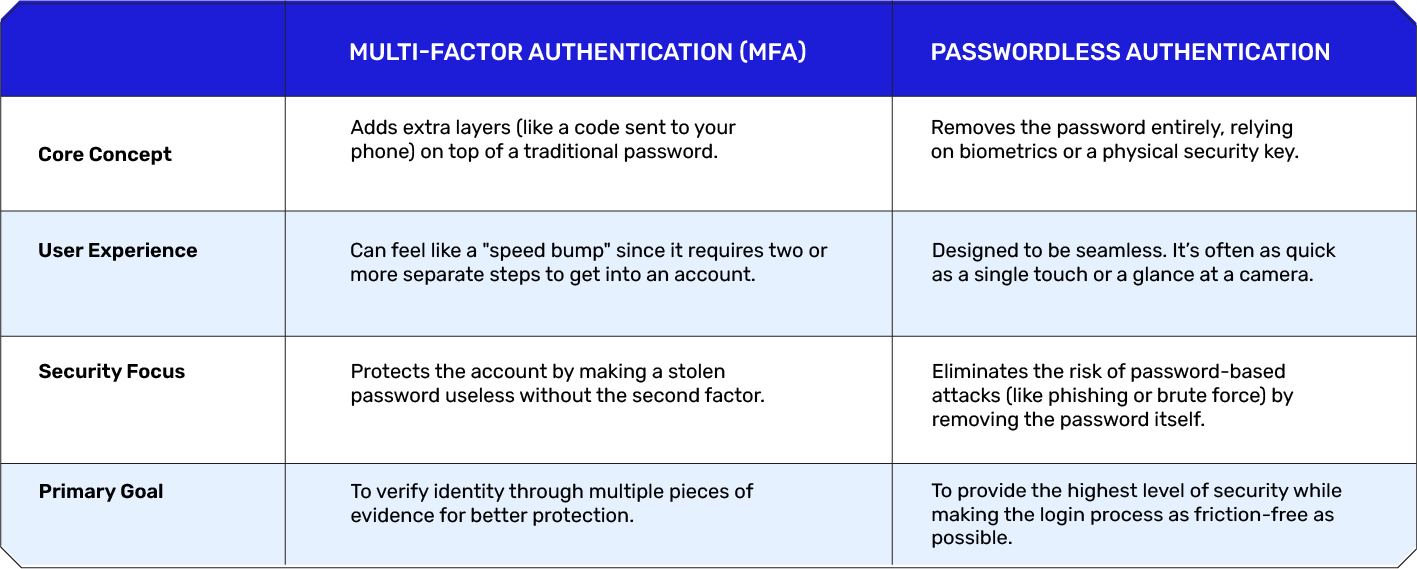
While MFA is a critical first step for any organization, passwordless is the modern gold standard. It shifts the burden of security away from the user’s memory and onto more reliable, sophisticated hardware.
Why Enterprises are Moving Beyond Passwords?
For decades, the password has been the cornerstone of digital identity. However, in today’s hyper-connected environment, it has become a liability rather than an asset. Modern enterprises are realizing that relying on “something you remember” is an outdated strategy that fails to keep up with sophisticated cyber threats and the expectations of a modern workforce.
Here is why the shift toward a passwordless future is no longer a luxury, but a necessity:
- Closing the Phishing Gap: Even the most complex password can be handed over in a moment of distraction. Phishing, credential stuffing, and social engineering attacks thrive because passwords are inherently shareable and stealable. By removing the password from the equation, you effectively eliminate the primary target for the vast majority of modern cyberattacks.
- Eliminating “Authentication Fatigue”: We are all suffering from login burnout. Between personal accounts and professional tools, the average employee manages dozens of sets of credentials. This leads to “password recycling”, using the same weak password across multiple platforms, which creates a domino effect if just one service is breached. Passwordless systems allow employees to get to work instantly, removing the mental friction of account management.
- Reducing the IT Burden: A significant portion of IT helpdesk tickets are related to simple password resets. This is more than just an annoyance; it’s a massive drain on operational budgets and productivity. When authentication is tied to a device or a biometric, those “I’m locked out” emails virtually disappear, allowing technical teams to focus on high-value projects instead of resetting “Spring2026!” for the tenth time.
- Meeting Higher Compliance Standards: Regulatory frameworks are becoming increasingly stringent regarding data protection. Moving beyond passwords helps organizations meet and exceed the requirements for Zero Trust architecture. It provides a more robust audit trail and ensures that access is granted based on verified identity and secure hardware, rather than just a leaked string of text.
How Passwordless Authentication Works
To understand how passwordless works, we first have to look at what it replaces. Traditional security relies on a “shared secret”, you know the password, and the server knows the password. If a hacker intercepts that secret, the game is over. Passwordless authentication removes that shared secret entirely, replacing it with a more secure exchange of data that never actually reveals your “key.”
Authentication Factors
Instead of a string of text, passwordless systems rely on one (or more) of the following factors to verify that you are who you say you are:
- Biometrics: This is the most common “human” factor. It uses unique physical markers like your fingerprint, facial geometry, or iris scan. Because these can’t be easily forgotten or shared, they are incredibly robust.
- Possession Factors: This is something you physically own. It could be a smartphone that receives a secure push notification, a hardware security key (like a USB token), or even a smart card.
- Cryptographic Keys: This is the invisible layer. Modern devices contain a “Secure Enclave” or a specialized chip that stores a private cryptographic key. When you log in, your device uses this key to sign a digital certificate that the server recognizes.
The Authentication Flow: Behind the Scenes
While the user experience is usually as simple as a thumbprint or a glance, there is a sophisticated “handshake” happening in the background. Here is how that process typically unfolds:
- The Initial Request: When you attempt to access a service (like your email or a company portal), the server sends a unique, one-time “challenge” to your device.
- Local Verification: Your device asks you to prove your identity locally, usually by asking for a fingerprint or a Face ID check. This step stays entirely on your device; your biometric data is never sent to the cloud.
- The Digital Signature: Once you’ve verified yourself to your device, the device uses its stored “private key” to sign the server’s challenge. Think of this as putting a wax seal on an envelope that only you possess the signet ring for.
- The Verification: The device sends this signed response back to the server. The server has a “public key” that can verify the signature but cannot recreate it.
- Access Granted: If the signature matches, the server knows for a fact that the person holding the physical device is the authorized user, and it grants access immediately.
This entire exchange happens in milliseconds. To the user, it feels like “Open Sesame.” To the enterprise, it’s a cryptographically certain way to ensure the perimeter remains secure.
Types of Passwordless Authentication
Not all passwordless methods are created equal. Depending on your organization’s security needs and the daily workflows of your employees, you might choose one or a combination of several methods.
The following table outlines the most common types used in modern enterprises today:
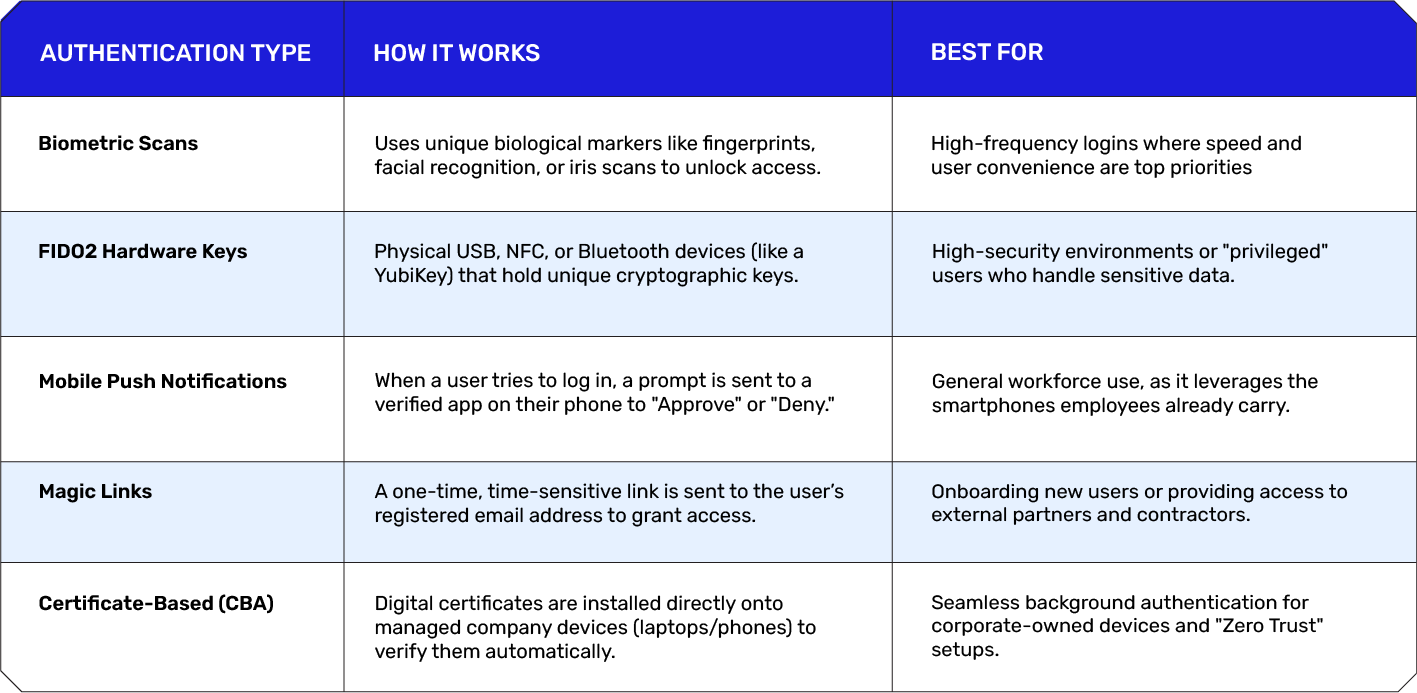
By moving to these methods, enterprises can move away from the “guessable” nature of passwords and toward a model where access is tied to something the user truly is or physically possesses.
The Benefits of Passwordless Authentication
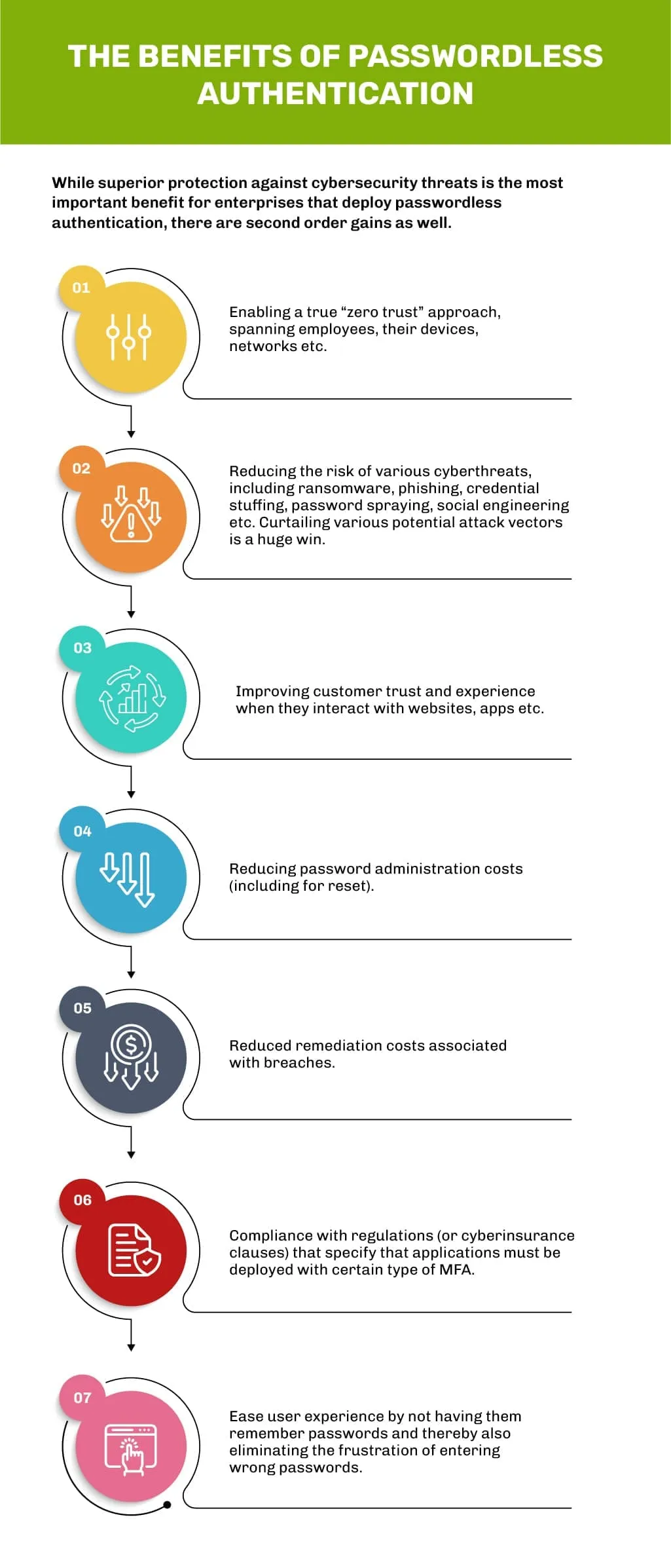
Moving to a passwordless model isn’t just about adopting the latest tech; it’s a strategic decision that touches every part of an organization, from the bottom line to the daily morale of the team. Here is why forward-thinking enterprises are making the switch.
1. Supporting a True Zero Trust Approach – In a Zero Trust environment, the guiding principle is “never trust, always verify.” Traditional passwords create a false sense of security because once a password is stolen, the system “trusts” whoever uses it. Passwordless authentication aligns perfectly with Zero Trust because it relies on high-assurance signals, like hardware possession and biometrics, ensuring that access is granted based on the actual identity of the user and the integrity of their device, every single time.
2. Reducing Cybersecurity Risks – The statistics are hard to ignore: the vast majority of data breaches involve stolen or weak credentials. By removing the password, you effectively close the door on an entire class of attacks. Phishing, brute-force “guessing,” and credential stuffing (where hackers use leaked passwords from one site to break into others) become virtually impossible when there is no password to steal in the first place.
3. Improving Customer Trust and Experience – For customer-facing platforms, friction is the enemy of conversion. When customers have to jump through hoops, or worse, go through a long password recovery process, they often walk away. Passwordless authentication allows for a “one-touch” entry that feels like magic. When security is this seamless, it builds brand loyalty; customers feel protected without feeling frustrated.
4. Lowering Password Management Costs – It’s a well-known “hidden cost” in IT: a staggering percentage of helpdesk calls are for simple password resets. Each of those calls represents lost time for the employee and an operational cost for the IT department. By eliminating the need to remember, change, and reset passwords, organizations can significantly reduce these recurring overhead costs and free up their technical teams for more important work.
5. Reducing Breach Remediation Costs – The cost of a data breach goes far beyond the initial hack; it includes legal fees, regulatory fines, forensic investigations, and the long-term cost of a damaged reputation. Because passwordless systems are significantly harder to compromise, they act as a high-value insurance policy. Preventing a single breach can save an enterprise millions of dollars in remediation and “clean-up” efforts.
6. Ensuring Regulatory Compliance – Global regulations like GDPR, HIPAA, and various financial industry standards are increasingly demanding “strong authentication.” Relying on passwords alone is quickly becoming a compliance liability. Passwordless systems, especially those using FIDO2 standards, meet and often exceed the strictest regulatory requirements for data protection, making audits much smoother for the legal and compliance teams.
7. Enhancing User Convenience – At the end of the day, we are all human. We forget things, we get annoyed by complex rules, and we appreciate anything that makes our workday easier. Passwordless authentication is one of the rare security upgrades that employees actually love. Replacing a stressful 16-character requirement with a simple fingerprint or a face scan drastically improves the daily user experience and reduces “authentication fatigue.”
Passwordless + MFA: A Combined Security Approach
There is a common misconception that you have to choose between going passwordless and using Multi-Factor Authentication (MFA). In reality, the most secure modern enterprises are doing both simultaneously. This is often referred to as Passwordless MFA.
The goal here isn’t just to remove the password, but to replace it with a combination of other, more secure factors. Instead of the traditional “Password + SMS Code” (which is increasingly vulnerable to interception), a combined approach might look like this:
- Factor 1 (Something You Are): A biometric scan, like a fingerprint or FaceID, performed locally on your device.
- Factor 2 (Something You Have): A cryptographic “key” stored on that same device or a separate hardware token.
The Best of Both Worlds
By combining these elements, you achieve a level of security that a password could never provide, without the friction usually associated with traditional MFA. Here’s why this hybrid approach is becoming the industry standard:
- Defense-in-Depth: Even if a biometric could be spoofed (which is incredibly difficult), the attacker still wouldn’t have the physical hardware key. This “multi-signal” approach ensures there is no single point of failure.
- Contextual Security: Modern systems can now look at “passive” factors alongside passwordless logins, such as your location, the time of day, and the health of your device. If something looks “off,” the system can trigger an additional verification step.
- Phishing-Resistance by Design: Because there is no “secret code” to type in, there is nothing for a user to accidentally give away to a fake website. The authentication is bound to the physical hardware and the user’s biological identity.
In short, combining passwordless technology with MFA principles doesn’t just add a lock to the door, it changes the door into a secure, biometric portal that only opens for the right person, on the right device, at the right time. It is the ultimate expression of “security that just works.”
Use Cases in Middle East Enterprises
The Middle East is currently one of the fastest-growing digital hubs in the world. As organizations from Dubai to Riyadh accelerate their digital transformation, they are moving away from passwords to protect their assets and provide a smoother experience for their people.
- Banking and Financial Services: In the UAE, the Central Bank has already set the stage for a passwordless future, mandating that financial institutions move away from vulnerable SMS-based OTPs by March 2026. Banks are now adopting biometric passkeys to ensure that high-value transactions are not only more secure but also more intuitive for the customer.
- Government and Citizen Portals: Under initiatives like Saudi Arabia’s Vision 2030, government services are becoming “digital-first.” Platforms like Nafath are integrating biometric verification to allow citizens to access healthcare, legal documents, and social services securely without the need for a traditional password.
- Energy and Critical Infrastructure: For the region’s massive oil and gas sector, security is a matter of national importance. Enterprises are using hardware security keys (such as FIDO2 tokens) to protect remote access for engineers working at refineries or desert sites, ensuring that even if a device is lost, the network remains secure.
- Retail and E-commerce: As digital shopping booms in the GCC, retailers are using magic links and Face ID logins to reduce cart abandonment. By making the login process as simple as a glance at a phone, they are building deeper trust with a tech-savvy consumer base that expects both speed and security.
- Healthcare and Telemedicine: With the rise of remote consultations, protecting patient privacy is paramount. Healthcare providers across the region are adopting passwordless systems to ensure that only authorized doctors and patients can access sensitive medical records, reducing the risk of identity spoofing through stolen credentials.
- Securing the Hybrid Workforce: As Middle Eastern enterprises embrace flexible work models, IT teams are deploying certificate-based authentication. This allows employees to log into corporate systems automatically from their managed laptops, providing a seamless office-like experience whether they are working from a café in Doha or an office in Kuwait City.
While the move toward a passwordless future is full of promise, it isn’t as simple as flipping a switch. For most enterprises, especially those with decades of established infrastructure, there are real-world hurdles that require a thoughtful strategy to overcome.
Challenges in Passwordless Adoption
- Legacy System Compatibility: Many legacy and on-premise applications still rely on traditional username and password authentication. Integrating modern passwordless technologies like FIDO2 often requires middleware, custom development, or infrastructure upgrades to bridge the compatibility gap.
- The “Lost Device” Dilemma: When a smartphone or hardware security key serves as a user’s identity, losing it can disrupt access. Organizations must implement secure account recovery processes that balance strong security with minimal impact on employee productivity.
- Cultural Resistance and the Trust Gap: Some users are hesitant to replace passwords with biometrics or security keys because passwords feel more familiar and controllable. Clear communication and user education are essential to explain that biometric data remains securely stored on the user’s device rather than on company servers.
- High Initial Implementation Costs: Adopting passwordless authentication often requires significant upfront investment in hardware security keys, infrastructure upgrades, software integration, and employee training. However, these costs are typically offset over time through reduced support requests and stronger security.
- Shared Workstation Complications: Industries such as healthcare, manufacturing, and retail frequently rely on shared workstations. Deploying individual biometric authentication or security keys in fast-paced shift environments can be operationally challenging if workflows are not carefully planned.
- Fragmented Standards: Although passwordless authentication is increasingly standardized through the FIDO Alliance, variations across browsers, operating systems, and mobile devices can still create inconsistent user experiences and compatibility issues.
Best Practices for Passwordless Authentication
Moving to a passwordless environment is a journey, not a one-day event. To ensure the transition is smooth and that your security posture actually improves, it’s important to follow a structured roadmap. Here are the industry-standard best practices for a successful rollout:
- Adopt a Phased Rollout Strategy: Roll out passwordless authentication in stages, starting with high-risk users such as IT administrators, executives, and finance teams. Once the deployment is validated and optimized, expand it gradually across the organization.
- Prioritize Phishing-Resistant Standards: Choose secure authentication protocols such as FIDO2 and WebAuthn, which use asymmetric cryptography to eliminate shared secrets and provide strong protection against phishing attacks.
- Design a Secure Recovery Process: Establish a reliable account recovery workflow for users who lose their phones or hardware security keys. Options such as backup codes, secondary trusted devices, or identity verification help maintain both security and business continuity.
- Educate Users Early and Continuously: Provide training and clear guidance on how passwordless authentication works, emphasizing that biometric data remains stored securely on the user’s device and is never transmitted to company servers.
- Support Legacy Systems: Integrate older applications using identity orchestration platforms or Single Sign-On (SSO) solutions, enabling a passwordless experience even when backend systems still rely on traditional credentials.
- Monitor Performance and Improve: Track login success rates, account recovery requests, and IT support metrics before and after implementation. Use these insights to refine user onboarding, documentation, and authentication workflows.
- Integrate with HR Systems: Connect the authentication platform with the organization’s HR directory to automate user provisioning and deprovisioning. This ensures employees receive appropriate access when they join and that access is immediately revoked when they leave.
By treating passwordless authentication as a strategic shift in culture rather than just a technical upgrade, you can build a perimeter that is both more secure and significantly more pleasant for your employees to navigate.
ABOUT AUTHOR


Recent Posts
- Rockwell Automation is rocked by serious Vulnerabilities: A Comprehensive Approach to Securing Industrial Control Systems
- 3 Reasons Your Cybersecurity Strategy Isn’t Working—And How to Fix It
- The Career Questions Most Young Professionals Are Not Asking Yet
- How AI Is Transforming the Security Operations Center
- Cloud cost optimization strategies for the Middle East| Paramount
FAQs on Passwordless Authentication & MFA
While MFA is significantly better than a password alone, it isn’t without its “growing pains.” For users, the main drawback is friction, having to stop what you’re doing to find your phone or wait for a text can be frustrating. For businesses, the challenges include:
- The “Lockout” Risk: If an employee loses their phone or deletes their authenticator app, getting them back into the system can be a time-consuming headache for the IT team.
- Vulnerability to Specific Attacks: Not all MFA is created equal. SMS-based codes can be intercepted through “SIM swapping,” and some users can be tricked into approving “push fatigue” prompts by persistent hackers.
- Operational Costs: Managing tokens, software licenses, and helpdesk support for MFA-related issues adds up quickly.
Most modern platforms follow a similar path to enable MFA. Generally, you’ll want to:
- Navigate to your Account Settings or Profile.
- Look for a section labeled Security or Sign-in & Security.
- Find the option for Two-Step Verification or Multi-Factor Authentication.
- Follow the prompts to link your chosen method, such as an authenticator app (recommended) or a mobile number.
Where you find your code depends on the method you chose during setup:
- Authenticator Apps: Open apps like Google Authenticator or Microsoft Authenticator. You’ll see a 6-digit code that refreshes every 30 seconds.
- SMS/Text: Check your phone’s messages. The service will send a one-time code to your registered mobile number the moment you try to log in.
- Email: Some services send a temporary code to your inbox. Be sure to check your “Junk” or “Promotions” folder if it doesn’t appear immediately.
- Google/Gmail: Go to Google Account > Security > 2-Step Verification.
- Microsoft 365: Visit Security Info under your account settings and select Add Method.
- LinkedIn: Go to Settings & Privacy > Sign-in & Security > Two-step verification.
- Social Media (Instagram/X): Usually found under Settings > Security > Two-Factor Authentication.
Authentication without a password relies on verifying your identity through hardware or biology rather than memory. Common ways include:
- Passkeys: The modern standard that allows you to log in using your device’s built-in security (like FaceID or TouchID) to sign a digital “handshake” with the website.
- Biometrics: Using your fingerprint or facial scan directly on your laptop or smartphone to unlock access to an app.
- Hardware Keys: Plugging a small USB device (like a YubiKey) into your computer to prove you are physically present.
- Magic Links: Entering your email and clicking a secure, one-time link sent to your inbox to log in instantly.

Protect your online assets from cyber threats with Paramount
Comprehensive cyber security solutions for individuals and businesses
Significantly reduce the risk of cyber threats and ensure a safer digital environment.
